


If you’ve spent any real time trying to use an AI coding tool inside VS Code, you’ve probably hit the wall where the agent starts forgetting what it already did, loops back over resolved errors, or grinds to a halt because the context window is filled up with terminal noise. Antigravity doesn’t have that problem thanks to the recent upgrade to 2.0. It’s so good that I was able to build an RSS reader with it and some used it to understand complex codebases. I didn’t once have to readjust or remind it what we were doing.
Antigravity 2.0 is a huge improvement
If you’ve used the original, this will feel like a true upgrade
Credit: Jorge Aguilar / HowToGeek
Opening Antigravity 2.0 for the first time is a real surprise, especially if you spent any time with the 1.0 IDE. The original had a real identity problem. It tried to squeeze a text editor and a resource-hungry Agent Manager into one cluttered split-screen, which bloated context windows with terminal noise, killed performance, and regularly sent CPU fans into a panic.
I hate the new look, and I hate the separation, but I have to admit it works a lot better. I originally left VS Code for Antigravity, and this is a big reason I’ll stay. Version 2.0 fixes the old issues at the root by separating the agent orchestration from the text editor entirely, turning it into a standalone, agent-first desktop app.
The new interface is fast, light, and uncluttered. It feels like a chatbot instead of a regular IDE. The performance jump is the most surprising part. I never have an issue with 2.0 slowing anything down. It sends me notifications every time, whereas that would constantly break on 1.0. Also, I never have an issue when I try to stop it in the middle of a task, which used to cause it to freeze and crash.
I started using Claude in VS Code because I feel like Claude is smarter and can handle a lot more than Antigravity could at 1.0. However, 2.0 feels a lot smarter than Claude is now.
Antigravity 2.0 handled the job surprisingly well
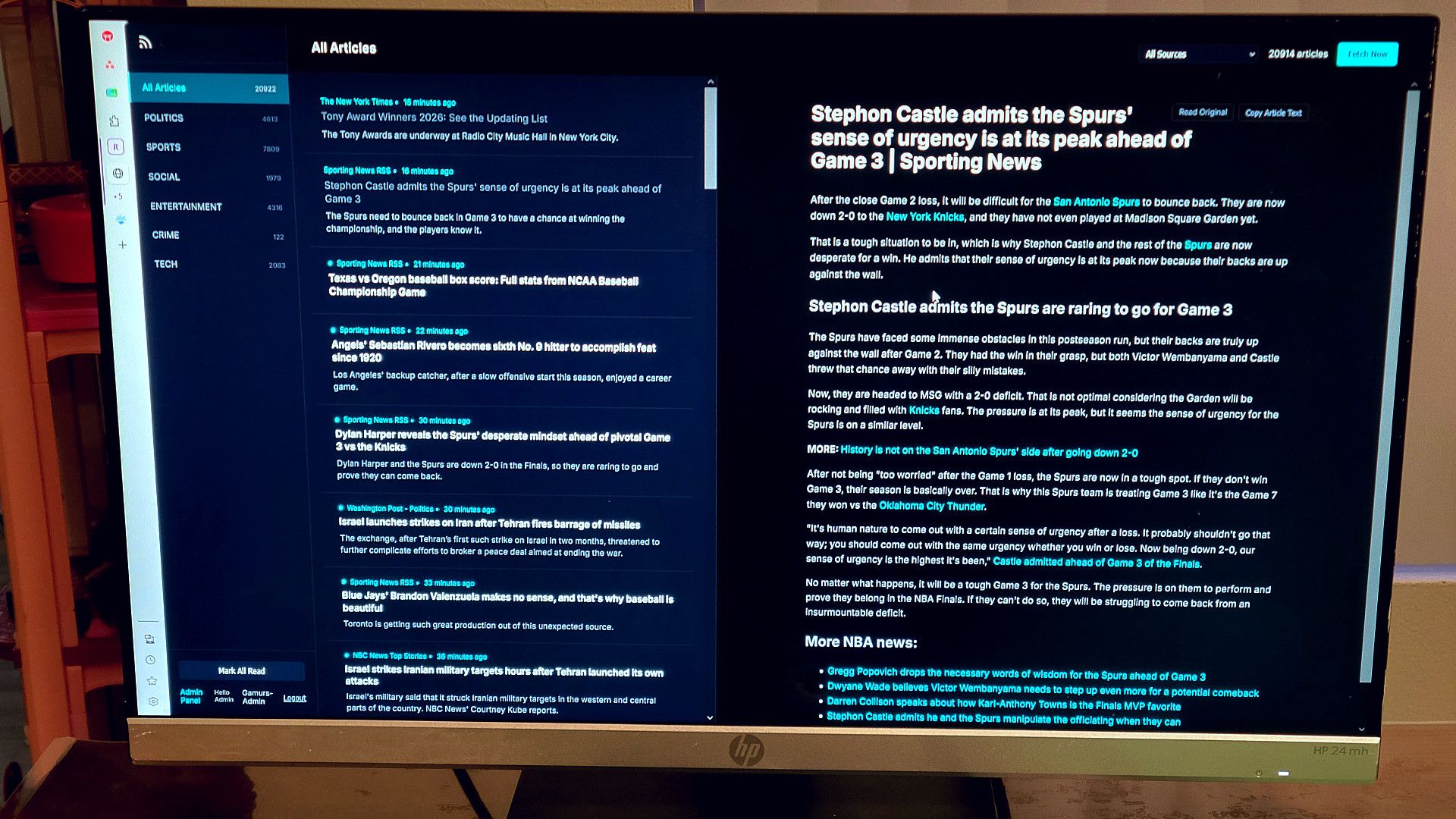
I gave Antigravity a master build prompt that I’d written, which laid out every detail of what I wanted. I needed a self-hosted RSS reader built on Node.js and Express, not from Google, deployed to Render.com with a Supabase PostgreSQL backend, fed by a curated list of RSS sources pulled from an old Feedly OPML export and a longer manual list I’d built up over time.
The prompt was thorough on purpose. It covered the tech stack, the database schema, the file structure, the visual design, the background worker logic, the retention policy, the seed script, the deployment config, and even the README.
Nothing was left to interpretation. I then told it to follow the phases strictly in order and not write a single line of code until it had verified every RSS feed URL first.
Several feeds in the OPML were years old and pointing at dead URLs, so the agent used its browser tools to track down current working endpoints for all of them. That alone was great, but along the way, it caught other feeds that were dead and swapped in the correct URLs after asking.
It compiled everything into a master feed database JSON before touching anything else.
Before code generation started, a few categorization fixes came back. It let me make a name for it, which changed it everywhere from the UI, the HTML title tags, and the render.yaml service definition, comments in the code, to the README. With that confirmed, all nineteen files were generated in the exact order the prompt specified.
From there, the project moved into deployment, and that’s when I had the back and forth that you’d generally have when making this yourself. The app was pushed to GitHub and deployed on Render, but things started breaking almost immediately.
This is why you cannot trust an AI by itself, and you need to follow along and know enough to make the fixes you need. For example, my first crash was a module resolution error. The routes were looking for auth.js using a path designed for a nested src folder, but the files were sitting at the root level.
The required paths got corrected across server.js and all three route files. Then Express was looking for HTML templates inside src/routes/views/ instead of src/views/, and those path strings got updated throughout the routing code.
I added in a username and password that became the admin credentials, but also the ability to add others. It all came from just telling it what I wanted and working back and forth to fix it. I even changed a few colors.
Claude isn’t as good as Antigravity 2.0
The context window problem in VS Code is worse than most people realize
Credit: Jorge Aguilar / HowToGeek
It’s tempting to think that using Claude inside VS Code is the best AI coding setup you can get. Building the RSS reader convinced me otherwise. The gap between that and Antigravity 2.0 is bigger than I expected.
The core issue with Claude in VS Code comes down to how poorly these extensions handle context. They have to resend the entire conversation history, terminal output, and file contents every single time you send a new message. So the more you work, the more tokens you burn, and it multiplies. The context window gets eaten up before you’ve actually done much.
Antigravity 2.0 is built differently from the start. Instead of cramming everything into one sprawling context window, it uses a hierarchy of subagents. The main orchestrator handles the big picture and spins up specialized subagents to tackle focused pieces of work at the same time. Each subagent runs in its own isolated loop and hands back a summary when it’s done, so the main context stays clean and never gets bloated.
Antigravity 2.0 is a huge step forward for Gemini, and I don’t think Claude in VS Code is worth the money because now you get more from Google’s plan than Claude’s.
Antigravity 2.0 may be too much for you
Antigravity 2.0 isn’t a perfect fit for every workflow. If you’re working on small, self-contained projects that don’t push context limits, the overhead of learning a new platform may not be worth it. The VS Code setup many developers already have is familiar and functional enough at that scale, and adding a Claude extension is more than enough. Where 2.0 shines is on anything multi-directory, multi-service, or long-running, where local extensions routinely fall apart. I built a full RSS reader with a Go backend, a React frontend, and a live database connection without a single context crash. That’s the argument for switching, and that’s why I’ll stick to it.
