


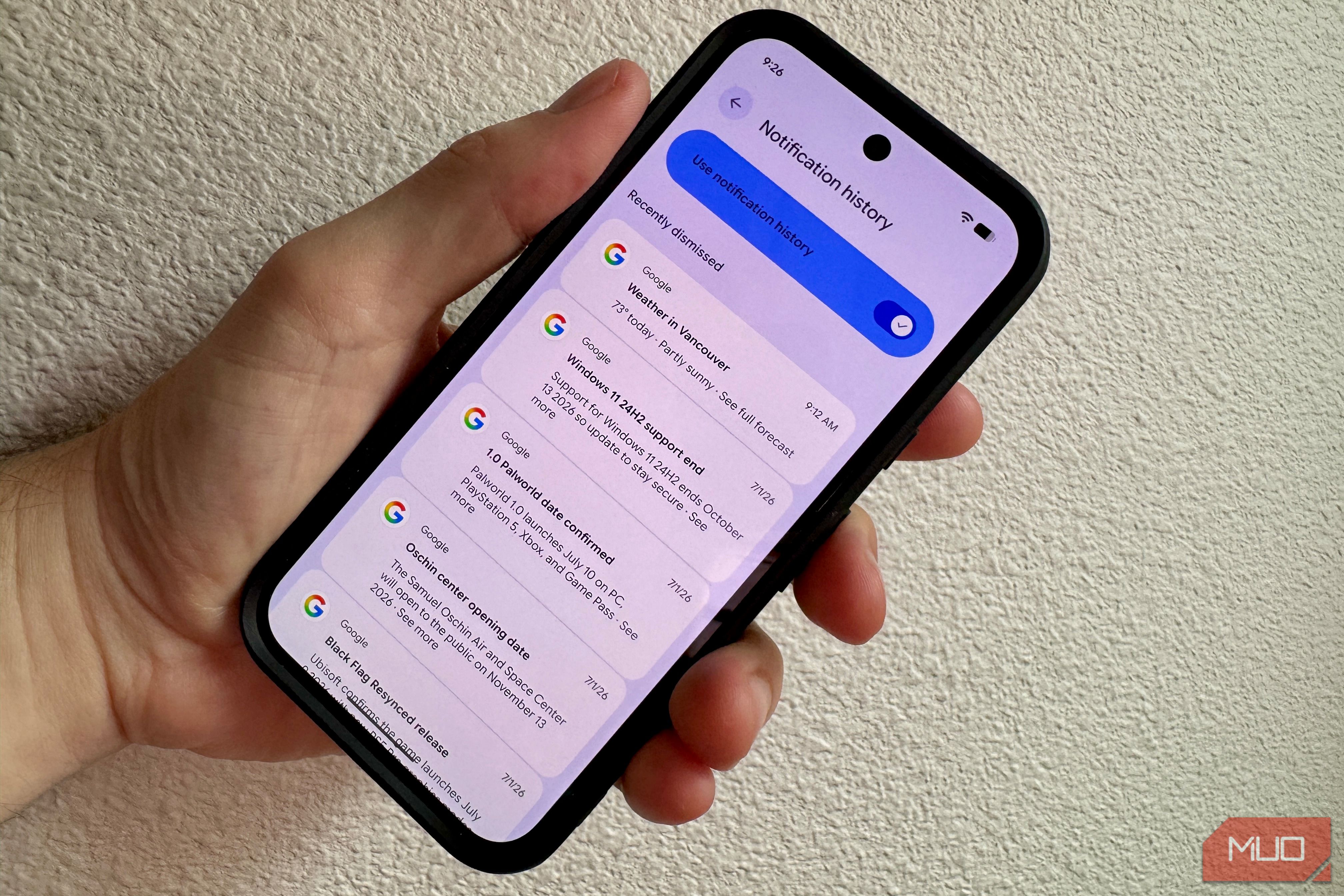
I don’t know about you, but I get a ton of notifications on my Android phone, and they’re not always important. I’m constantly swiping them away, fast, to get to the ones that matter. Occasionally, I’ll swipe away something that I didn’t actually mean to. That’s when I wish I had turned on Android’s built-in Notification History.
Why it’s off by default is a technical tradeoff, but luckily, you can enable the feature now and never have to regret dismissing an important notification again. Here’s how.
Related
8 Android Features I Wish I Knew Sooner
I’ve been missing out, maybe you have, too.
How to access Notification History
Hop into Settings
The menu path you’ll use is different on stock Android (Google Pixel, Motorola, etc.) vs Samsung vs other Android-based phones, so feel free to poke around if it’s not in the same place.
On a Pixel, though, you’ll open Settings and tap Notifications, then tap Notification History. Toggle that switch called Use notification history to ON.
If you’re on Samsung’s One UI, you can open Settings and tap Notifications, then Advanced settings. Tap Notification History and toggle it to ON.
If you really want to get to this without messing about with the Settings path, you can tap the blank space where it says “You’re all caught up” on stock Android like Pixel. That will launch the history log directly.
Even better, you can add a custom home screen widget to access the Notification History directly. On my Pixel, I long-pressed the home screen, tapped Widgets, then dragged the Settings Shortcut widget to the home screen. A pop-up list of shortcuts to the Settings app showed up, and I chose Notification log. A little icon showed up on my home screen that took me right to the log when I tapped it.
If you want to dive deeper into alternative ways to manage your alerts, check out this guide on smarter ways to handle your Android notifications.
How the log works
Here are the tech details
Android won’t keep a permanent lifetime log of all your notifications. By default, the system’s database keeps notifications for 24 hours before it automatically purges them to save your local storage space.
The log has two sections, the Recently Dismissed notifications and the Last 24 hours section. The former is a chronological list of notifications you’ve swiped away recently, while the latter is a per-app breakdown of how many alerts an app sent you during that time period. You can expand them to see the actual text of the notifications.
You can tap into an archived notification to open the corresponding app, but you cannot interact with any quick actions the original notification may have had, like hitting Reply or Archive.
But why is it turned off by default? Basically, it’s a trade-off between battery life and performance management. Running a system that constantly monitors, processes, and writes incoming data to a rolling database uses background CPU cycles and memory. While high-end flagship phones won’t even blink at this workload, Android is an operating system designed to run on everything from ultra-premium devices to entry-level smartphones with very limited RAM.
To make sure budget devices don’t suffer performance stutters, lag, or unnecessary battery drain right out of the box, Google likely chooses to leave the feature disabled across the board. By forcing it to be an intentional, opt-in feature, Android protects its lowest-spec hardware while still including a useful feature like this. You just have to turn it on.
Privacy and security considerations
This is entirely local
There is zero cloud sync here; the history log is only on the single device you enable it on. You won’t be able to hop onto a Google website, for example, and see notifications from any of your phones. According to the Android Open Source Project (AOSP) architectural guidelines, your notification history is managed entirely by a local, on-device system server database. Because it contains sensitive data like 2FA codes and private messages, it’s completely excluded from Google Cloud backups and never synced between devices.
The coolest part of this fact is that you might actually be able to recover notifications for things like disappearing messages. If you swipe away a WhatsApp notification, for example, Notification History will keep track of the message, even if the sender hits “Delete for everyone.” When someone sends you a message, your phone instantly generates a push payload—the raw text data sent via Google’s push servers—and displays it in your notification tray. The exact millisecond that alert arrives, Android logs it into your local history database. If the sender panics two minutes later and hits delete, the app will update its own interface to say “This message was deleted,” but it lacks the system-level permissions required to reach back into Android’s protected local database and alter your history files.
Never miss a notification again
Notification History only works when it’s on, so none of your dismissed notifications from before enabling it will get logged. After you activate it, though, you’ll have 24 hours to recover anything you didn’t mean to swipe. If nothing else, it’s going to keep all of us from the consequences of too-fast swiping behaviors.
SoC
Google Tensor G4
Display
6.3-inch Actua pOLED display, 1080 x 2424 resolution, 60-120Hz, 3000 nits peak brightness
RAM
8GB
Storage
128GB, 256GB
Battery
5,100 mAh
Ports
USB-C
The Google Pixel 10a is a budget-oriented smartphone with a flat back and long battery life. It’s powered by the same Tensor G4 chip as its predecessor, and many key specs are identical to the Pixel 9a. However, you do get a brighter screen, better modem, new software features, and Android 16 with seven years of software support.
