


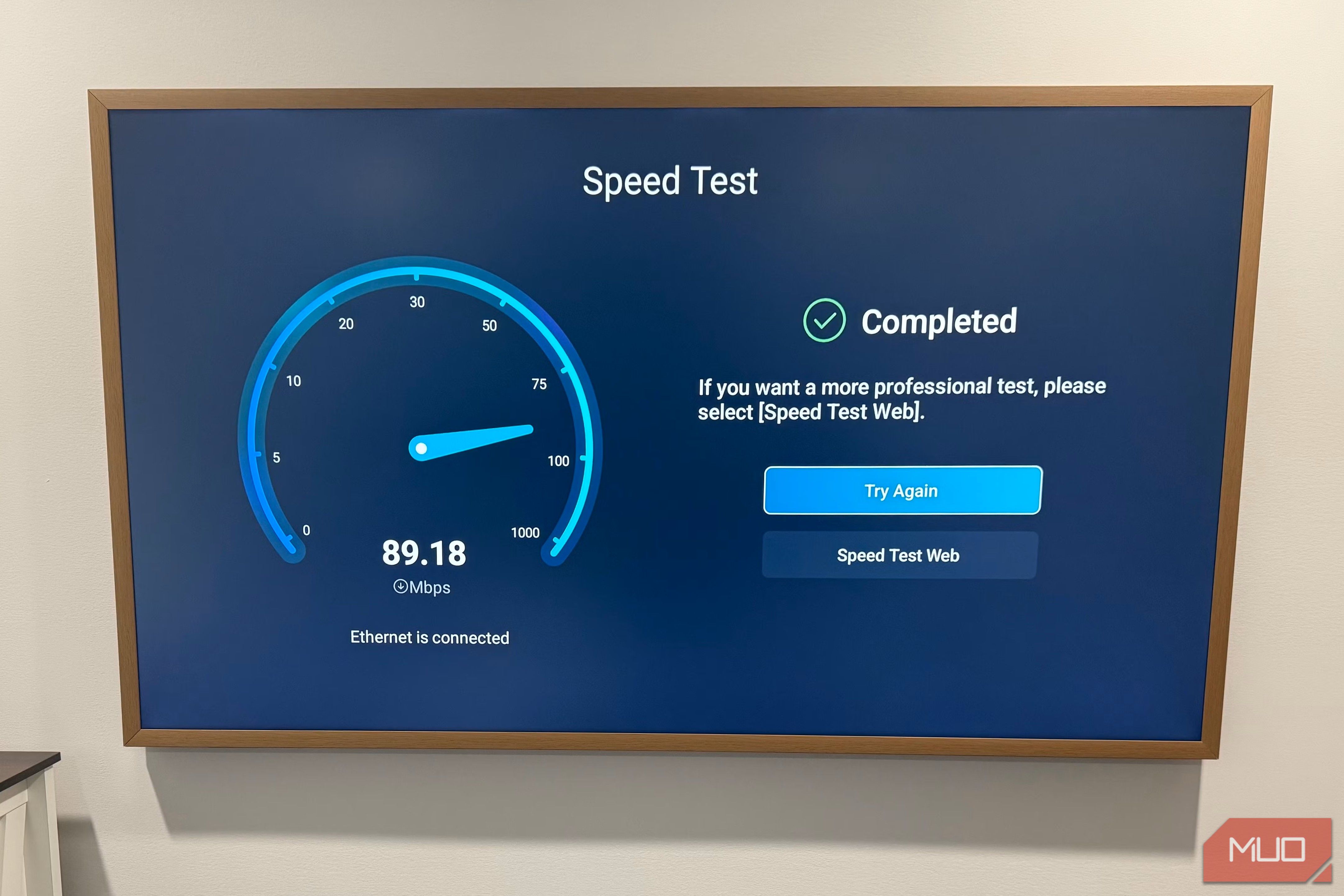
Ethernet is supposed to be the fast lane. Solid, stable, and always better than Wi-Fi. But when it comes to smart TVs, that rule doesn’t always hold up. Not because Ethernet is flawed, but because of that slow, limited Ethernet port most TVs come with.
Yes, the Ethernet port on most smart TVs is only capable of handling speeds up to 100 Mbps, which is basically the bare minimum internet plan these days. So even if you’ve gone through the effort of setting up a wired connection on your TV, you might not actually be getting the speeds you’re paying for. The good news is that it’s easy to overcome this limitation. All you need to do is throw a simple USB to Ethernet adapter into the mix.
Related
The Surprising Device That Can Transform Your Home Internet: Here’s How It Works
You don’t need to spend loads of cash to get faster internet.
Wi-Fi may be faster than Ethernet on your TV
The rare case where Wi-Fi wins
Pankil Shah / MakeUseOfCredit: Pankil Shah / MakeUseOf
It might sound wrong at first. For years, Ethernet has been the gold standard for speed and reliability. Plug it in, and you get a consistent performance without any interference.
But the thing is, most smart TVs come with a built-in Ethernet port that tops out at just 100 Mbps. Not gigabit. Not even close. Meanwhile, modern TVs do come with Wi-Fi 5 or Wi-Fi 6. Under the right conditions, that wireless connection can easily push past 100Mbps, sometimes much higher depending on your internet plan.
The reason manufacturers stick with a slower Ethernet port on a smart TV mostly comes down to cost and practicality. You see, smart TVs rarely need ultra-fast wired internet for what they do. Streaming services like Netflix, YouTube, and Prime Video don’t require anywhere near 100 Mbps, even for 4K content.
So, instead of adding an expensive Ethernet controller, they stick with a simpler 10/100 port. It helps keep the prices down without actually affecting the experience for the average viewer. But if you’re on a faster internet plan, say 300 Mbps or more, this limitation becomes real. Your TV can’t take advantage of those extra speeds over Ethernet. It simply hits a ceiling and stops there.
Since your TV’s Wi-Fi hardware is often far more capable than its Ethernet port, a strong wireless connection can actually deliver higher speeds than a wired one. So, while it may sound counter-intuitive, you’re often better off using Wi-Fi than Ethernet on a smart TV.
Breaking past your TV’s Ethernet speed limit
Turn your TV into a gigabit-ready device
Amir Bohlooli / MUOCredit: Amir Bohlooli / MUO
So if 100 Mbps is enough for streaming, why even bother bypassing that limit in the first place? Well, there are a couple reasons you might want to do that.
Wi-Fi can be fast, sure, but it’s still prone to interference and signal drops. If your TV is far away from the router or if there is too much interference, a wired connection is the way to go. Also, if you’re into cloud gaming or simply want to make full use of the internet plan you’re paying for, an Ethernet connection makes a lot of sense.
The good news is that even if your TV’s built-in Ethernet port is stuck at 100 Mbps, you’re not out of luck. A USB Ethernet adapter can help you overcome this. It works because it has its own networking chip inside, which means it doesn’t need to rely on the TV’s Ethernet controller at all. As long as your TV supports the adapter, it’ll recognize it as a standard wired connection. You’re essentially giving your TV a second, faster Ethernet port.
A good USB 3.0 Ethernet adapter can support speeds of up to 1 Gbps, which is ten times faster than what most TVs offer through the built-in port. Of course, this works best if your TV has a USB 3.0 port, which most modern TVs do. But even with a USB 2.0 port, you’re still looking at a theoretical limit of 480 Mbps, which is still far beyond the 100 Mbps cap.
Adding a faster Ethernet port to your TV is easy
You don’t need much
If you’re already using an Ethernet connection on your smart TV, you don’t need to do anything special to upgrade. First, grab a USB-to-Ethernet adapter from Amazon. They’re quite inexpensive, usually somewhere between $10 to $25, depending on the brand and the maximum speed they support. If you go for a USB-C adapter, you’ll also need an USB-A to USB-C converter, since TVs only have the standard USB-A ports.
Also, make sure your Ethernet cable isn’t holding you back. If it’s a Cat 5 cable, your speed will be limited to 100 Mbps because of the cable. A basic Cat5e or Cat6 cable is more than enough for this setup. You don’t need to overthink this part unless you’re running very long cables across your home.
Once you have everything ready, plug the adapter into your TV’s USB 3.0 port. Most smart TVs do support USB Ethernet adapters out of the box, so your TV should detect the Ethernet connection automatically and connect to the internet.
Honestly, the 100 Mbps limit is not really a problem for most people. In fact, many won’t even notice it, even after using a smart TV for years. But if you’re someone who wants the fastest speed possible, this USB trick is quite easy and can work wonders.
Brand
UGREEN
DATA TRANSFER RATE
1000Mbps
Color
Space Grey
UGREEN USB to Ethernet adapter delivers ultra-fast speeds of up to 1 Gbps, providing a stable and reliable wired connection for your smart TV, PC, laptop, and Nintendo Switch.
