


Samsung’s Gallery OneDrive integration was a feature that I forgot even existed because it just worked so well behind the scenes. My photos quietly synced both ways in the background and appeared in OneDrive like magic.
Now, Samsung is retiring the feature, with its last day being the 30th of September 2026. This, of course, means finding a replacement, so I decided to be proactive and get it sorted ahead of time. I tried 10 alternatives, but in the end, I found five workable options for different users. The fifth application genuinely surprised me and became my go-to solution.
OneDrive is the obvious fix if you already use Samsung’s sync
It keeps the same cloud storage, but loses the Gallery’s simplicity
This was the first option I tested. One, because I already had a OneDrive account, and two, because I assumed they’d make the swap-over easy enough to perform. This should have involved toggling a few options on and off and delegating the syncing task to the official Android OneDrive app.
The official instructions state that it’s just a matter of opening the OneDrive app and selecting the option to back up the camera. But of course, in true Microsoft style, the option was nowhere to be found. The app won’t show the option until I disable OneDrive syncing in the Gallery and then unlink my Microsoft account from Samsung in the Android settings.
Once it was up and running, it did the job fine. New photos were uploaded to the same Microsoft account, and my existing images were still there waiting for me. One gotcha here for anyone who needs to watch their data is that with the OneDrive camera backup, all of your images get backed up, not just camera files.
For anyone like me who already pays for OneDrive storage, this is probably the cleanest option. If you’re stuck on the free-tier 5GB option for OneDrive, take a look at some of the other options I tried below.
Google Photos is the easiest full photo library replacement
It feels clean, but you have to accept Google as the new home
If you’re anything like me and just happily let Samsung Gallery’s OneDrive sync do its thing, you’ve probably not opened Google Photos for a while, mostly because it’s not a real backup tool. I had mostly ignored it, which made this test mildly annoying because I had long ago turned off Google Photos backup, and it was technically one of the strongest replacements.
The setup was simple. I opened Google Photos and was immediately presented with the option to enable backup. The app didn’t let me choose which folders to back up, but several hundred gigabytes of data and over 11,000 files later, it seemed to have synced every single image under the DCIM folder.
Compared with the standalone OneDrive app, Google Photos felt more like a complete gallery replacement. Together with some cool new features like automatic organization and AI-powered search, I can easily recommend Google Photos as a replacement for the Gallery OneDrive sync. The trade-off is that you’ll be moving your entire photo and video collection to Google, which for some people might be a bit of a deal-breaker.
OS
iOS, Android
Price model
Free
Google Photos is a gallery app, photo editor, and cloud storage solution. It’s an easy way to back up your photo or video collection, make edits using generative AI, or share albums with others. You get up to 15GB of storage completely free.
Proton Drive is the privacy-first option I did not expect to like
It is simpler than Google Photos, and that is partly the point
Proton Drive was extremely straightforward and didn’t try hard to impress me, which I actually appreciated. It also asked nicely what folders I wanted to back up, rather than just assuming I needed the entire DCIM directory synced.
The setup is as easy as downloading and installing the app, creating a new free account, and granting the app access to my files and folders. It felt familiar enough to use with almost any cloud backup tool, but I did like having more control over what content was synced.
The big difference between something like Google Photos and Proton Drive is privacy. Google Photos does encrypt in transit and at rest, but Proton Drive’s big selling point is that it provides end-to-end encryption. With Proton Drive, your files are encrypted on your device before they’re sent to the cloud, so even Proton itself can’t access them.
That privacy focus does mean you don’t get the slickest gallery app out there. But if privacy matters to you more than AI search and a curated reel of memories at the end of the week, Proton Drive is the ideal choice.
OS
Windows, macOS, Linux
Brand
Proton
Proton Drive is an end-to-end encrypted cloud storage service built to keep your files private, even from Proton itself.
FolderSync gave me control instead of another photo app
It is not pretty, but it sends photos exactly where I tell it to
FolderSync is absolutely not the most glamorous app in the world, but it gave me complete control. It doesn’t care about memories, albums, faces, or sorting photos into clever libraries. It just moved the folder I chose to the server I wanted.
That’s the whole point. FolderSync isn’t so much a Samsung Gallery replacement as a simple folder sync tool, similar to apps like Syncthing. You simply install it, select a local folder to sync, choose whether to sync one-way or two-way, then select the destination.
As far as destinations go, FolderSync supports a huge range:
- SFTP/SSH servers
- FTP/FTPS servers
- WebDAV servers
- SMB and CIFS
- Google Drive
- OneDrive
- Dropbox
- Amazon S3-compatible storage
Since I was already enjoying the control, I decided to set the sync destination to a server I had already set up as an offline project via SFTP. This meant that syncing could only occur when my phone was connected to my LAN, but that was fine with me since it saved on data.
The downside to this particular app is obvious: there’s no polished gallery, and it does take a bit more know-how to set it up. But if you already have a NAS or file server at home, FolderSync will do just fine as a simple, controllable photo sync tool.
OS
Windows, macOS, Linux, Android
Developer(s)
Tacit Dynamics
FolderSync is a powerful Android sync tool that keeps local folders and cloud storage in step with scheduled, rule-based file transfers.
Immich is the self-hosted option for people who secretly want a challenge
It takes more effort, but you own the whole process
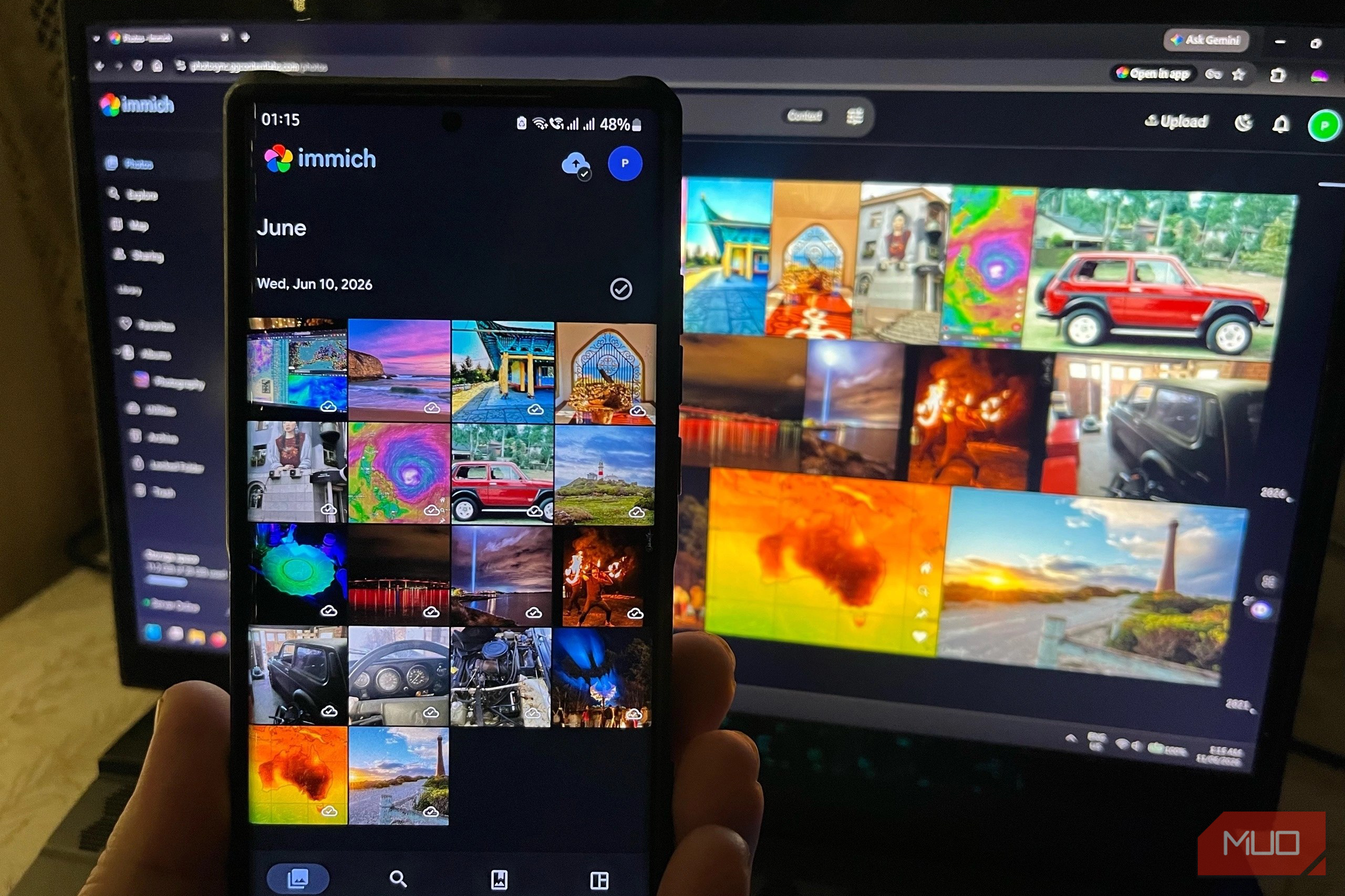
Immich is a self-hosted photo and image management solution that nicely blends Google Photos and FolderSync. After playing around with Immich in a VM, I decided this tool really deserved a proper server behind it.
Since I had a VPS on hand that was essentially just hosting a DNS server for another project, I installed the Immich Docker container and put it behind Caddy to serve it over HTTPS. Compared with FolderSync, it felt like a proper photo platform rather than a UI over a file transfer. Immich’s web gallery made the library useful beyond my phone, and the Android app made backing up feel as familiar as the old Samsung Gallery did.
Immich also has a suite of cool extras, like shared albums and public links, so you can share photos and entire folders with others. The downside of self-hosting my entire photo sync process is having to think about keeping the server secure, managing updates, and backing up the synced files themselves.
That said, for those who love self-hosting to save on subscriptions, Immich is about as cool as it gets as a replacement for Samsung Gallery OneDrive sync. That’s why Immich has now become my go-to for not only my Samsung gallery but also other devices.
OS
Linux, Windows, macOS, Android, iOS
Price model
Free
Immich is a self-hosted solution that allows you back up, organize, and manage your photos on your own server. It allows you to browse your photos and videos with ease and does not sacrifice privacy.
I found plenty of replacements, but not a perfect clone
None of these options can fully replace the simplicity of Samsung Gallery’s direct sync with OneDrive. Because it sat inside the Gallery app and synced away quietly in the background, I never had to give it a second thought.
Of the alternatives I tried, I would recommend the simple switch to the OneDrive application for those who already have a Microsoft account and paid subscription. Google Photos is, of course, another easy option if you’re fine with giving control over to Google. Proton Drive is the privacy pick and one of the simplest to set up.
FolderSync is for people who want more direct control over what gets backed up and where it goes. Immich is the self-hosted route, and it’s the one I landed on as my replacement for Samsung Gallery photo syncing.
The right replacement does really depend on what you actually need from your photo backup. Whether that’s a convenient drop-in replacement, more control and privacy, or full ownership of the whole thing. Samsung’s old sync was brilliant because I never had to think about it. Now I do, which is a bit annoying, but switching over to Immich now saves me from a mad rush come September.
Related
Android backups have a big problem, but Google could fix it
Google might finally give you a choice
