


If you’ve been a long-time iPhone user, you must be aware of common iOS tricks, like hidden settings, Control Center shortcuts, double-tap gestures, and more. Beyond these, your iPhone has some tools that Apple never advertises. And, these are dialer codes. They can tap into system menus, fetch detailed network information, fetch data usage, and do a lot more for you. I’ve been using some of these hidden iPhone codes for years now, and it has helped me discover tools that Apple never shows.
Field Test Mode: *3001#12345#*
Your secret signal dashboard
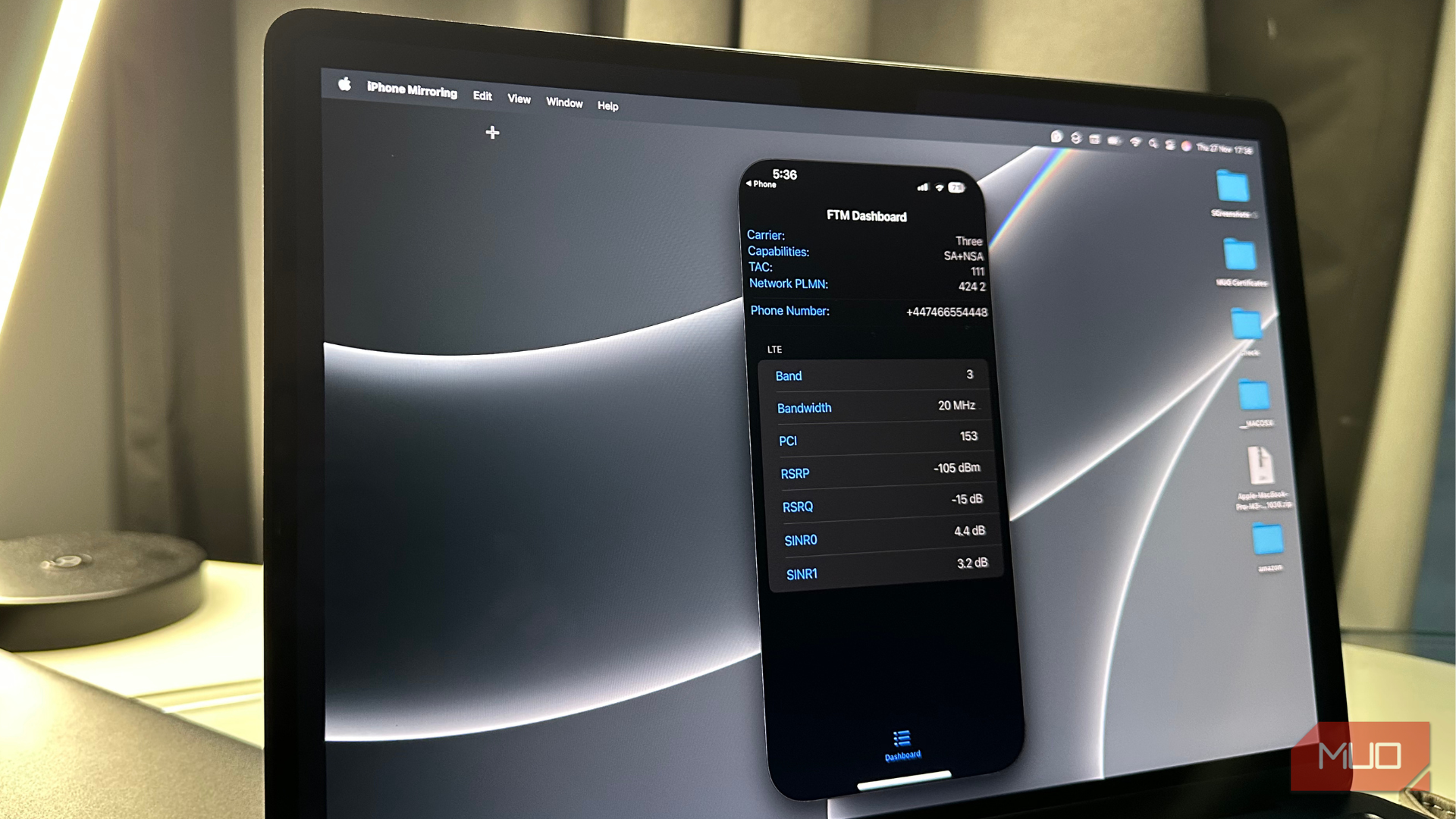
FTM Dashboard on iPhone
Well, this isn’t just a code. It gives you a hidden engineering dashboard that Apple never shows in the Settings. Just dial 3001#12345#*, and it will turn your iPhone into a mini network analyzer that displays detailed information like signal strength, network bands, which cell tower you’re connected to, your network carrier capabilities, and more. This code comes in really handy when your network connection feels sluggish, or you simply want to analyze signal performance in your home or specific areas. It also helps you make much better and informed network choices. So, forget those signal bars; this dashboard actually gives you more detailed network data.
Call Forwarding: *#67#
Know your call forwarding status
Check call forwarding status with iPhone code
Have you ever missed a call and wondered where it went? The *#67# and *#4004# codes can give you a detailed overview of the call forwarding settings on your iPhone. It will show up if your call and message forwarding are active, and which number they are routed to when your iPhone is busy, unreachable, or not answered. This is especially useful if you’re using dual SIM, troubleshooting your call issues, or have set up voicemail alternatives.
If you see a “Failed/Error” message instead of “Enabled or Disabled”, it might be possible that your carrier doesn’t support this feature on your current plan.
Call Waiting: *#43#
Check whether call waiting is active
Check Call Waiting Status on iPhone
Unarguably, call waiting is a super-useful feature that ensures you never miss an important call, even if you’re already in another conversation. Many users don’t think about this feature until it stops working. If your friend, family, or teammate often says they tried calling you but your phone was busy or their call was directed to voicemail, just dial *#43# to quickly check if call waiting is active. If you can’t find this option in your iPhone settings, this code lets you verify the status in seconds.
Again, if you see a Failed/Error message, it’s likely that your carrier doesn’t support this feature.
Forward calls to a specific number: *21[number]#
A quick way to route your calls
Forward calls to a specific number
Your iPhone settings also let you set up call forwarding, but this secret code lets you do the same much faster. You don’t need to dig into the settings app; just dial *21[number]#, and your calls will be forwarded to that number. This is super helpful when you’re traveling, switching SIMs, using a temporary phone, or want your work calls on your offline line rather than your personal number. If you wish to cancel call forwarding, just dial ##002#.
Check bill balance: *225# (some carriers only)
See your balance without opening anything
Code to check bill information on iPhone
This hidden iPhone code lets you check your bill in seconds. When you dial *225#, #225, or #225#, it sends a query to your network provider and shows your balance via SMS. The code works right from your dialer, which gives you convenience when you’re low on data, traveling abroad, or the carrier app/website fails to load on your iPhone. This works best with prepaid plans, but not all network carriers support it. If yours does, it’s the fastest way to check your bill or balance information.
Check data usage: *3282# (some carriers only)
Get a quick summary of your data usage
iPhone code to check data usage
Just like checking your bill balance, there’s a dialer code to know your data usage as well. When you dial 3282 (spells DATA), you get a quick summary of data usage, like total plan usage, your billing cycle, and if you’ve exceeded the allotted data included in your plan. It helps you understand everything your carrier counts, and it comes in handy when you want to make sure you aren’t being overcharged by your network provider.
Each carrier follows a different format. Verizon is #3282, AT&T goes with *3282#, and T-Mobile follows #932#.
Emergency Alert Status: *5005*25371#
Check if your iPhone can test emergency alerts
Check if emergency alerts are allowed on your iPhone
It’s crucial to double-check if your iPhone can receive emergency safety alerts during real threats, like severe weather warnings, terrorist attacks, floods, or other dangers. When turned on, your phone will make a loud, alarm-like sound in case an alert is issued. You can quickly dial *5005*25371# to double-check if your device is configured to receive the emergency alerts from the government and other emergency services. Dialing the code won’t play a sound; it will only show you if test alerts are allowed or not.
IMEI number: *#06#
Skip digging through the Settings app
Check IMEI number using iPhone code
This is one of my most-used iPhone codes. Every time I want to activate a new phone, check warranty status, trade in my older iPhones, or verify the legitimacy of a used phone, I simply dial *#06#, and it shows me the IMEI and EID, which is a unique 32-digit number on devices with eSIM support. The code is pretty short and easy to remember. Also, it’s much faster and convenient than diving into the settings app. You need your IMEI number more often than you realize, which makes it one of the most useful iPhone codes every user should know.
Related
I had no idea the iPhone search bar could do all this
Don’t just search—accomplish so much more with your iPhone’s search bar.
Hide caller ID: *67
Block caller ID for one call
Hide caller ID for one call on iPhone
There can be instances when you want to call someone without exposing your phone number. When you want to do this, just prefix that number with *67. When you do this, it will hide your caller ID for that particular call and replace it with a Private Number label. This is especially useful when you’re calling some businesses, sellers, or people you don’t know really well. Just remember, *67 works in the United States. For other regions where this isn’t supported, the equivalent code is *31#.
More iPhone power, fewer taps
IOS already offers a bunch of built-in tools and shortcuts. These dialer codes unlock secret tools that Apple doesn’t advertise or show up directly in the Settings app. They are free, fast, and work on all iPhone models as long as your region and network provider support it. Whether I want to troubleshoot a weak signal on my iPhone or quickly forward calls to a number, these codes make everything easier. The best part is, you don’t need any extra effort, hacks, or technical skills.
