


Anthropic, the maker of Claude, is one of the AI companies that has been particularly prolific lately. The company has been dropping new feature after feature, and it’s gotten to the point where keeping up with its launches has become a challenge in itself. People all over social media have been joking about what job Anthropic will announce Claude can do next.
In the past few weeks alone, the company announced Code Review, Claude Marketplace, Connectors, Remote Control in Claude Code, and Scheduled Tasks within Claude Cowork. But as a visual learner, the feature drop I find most exciting is one that flew a bit more under the radar: interactive visuals.
What are Claude Interactive Visuals?
No, this isn’t just Artifacts with a new name
Amir Bohlooli / MUO
Anthropic announced Interactive Visuals on the 12th of March 2026 as an expansion of Imagine with Claude, a temporary experience the company showcased in late 2025. The new feature lets Claude generate charts, diagrams, and visual explainers right within the conversation. Claude builds these using HTML, meaning they’re not static images, and you can interact with them directly. Custom visual responses are available to all Claude users in beta on the web and desktop. They aren’t available on Claude for iOS or Android.
If your first thought after reading the above is “doesn’t Claude already create diagrams?”, that’s completely fair. That was exactly what I wondered at first too. Claude has had an Artifacts feature since June 2024 that lets you “turn ideas into shareable apps, tools, or content.” For instance, you might have noticed that when you ask Claude to write up an essay, it opens the document in a separate side panel on the right, where you can edit, copy, or download it as a standalone file. That’s exactly what an Artifact is. Beyond essays, Artifacts can be code snippets, single-page HTML websites, SVG images, flowcharts, or even fully interactive React components.
Related
ChatGPT Is Getting Old: Try This Ultra-Smart AI Alternative Instead
If you’re bored with ChatGPT or want to try something new, Claude is the answer.
Unlike Artifacts, which are meant to be standalone outputs, interactive visuals are more conversational. Claude automatically generates them when it determines that a visual would explain something better than text alone. Instead of opening in a separate side panel, visuals render inline right between paragraphs of Claude’s responses.
So, essentially, you don’t need to explicitly ask Claude to create a visual (though you totally can). Unlike Artifacts, visuals live inline within the conversation and are inherently temporary. They change and adapt as you ask follow-up questions, and are simply aids that make the conversation itself easier to comprehend and follow. That said, you can still choose to keep a visual by taking a screenshot of it, saving it as a .svg or .html file, or converting it into an Artifact.
A visual thinker’s dream come true
I’ve always been the kind of person who understands better when someone shows me rather than explaining it for the third time. If you’ve ever zoned out when someone’s explaining something, or when reading instructions but immediately understood a flowchart, you know exactly what I mean. This feature is the equivalent of someone quickly tearing out a piece of paper to draw a quick diagram while they’re explaining something. Except here, the diagram is fully interactive and engaging. Here are a few examples I used to test out the feature:
Visualizing Digital Logic Circuits
AI has been a massive help when it comes to understanding tricky concepts while studying. As I write this, I have a quiz for one of my courses this semester: Digital Logic and Design. One of the first things I tried with this feature was creating interactive visuals for the course.
I first asked Claude, “Hey, how do logic gates work?” and it gave its usual text explanation, with a visual right in the middle of the answer. It was a static visual, though, so I changed my prompt to, “Hey, show me how logic gates work.” Sure enough, it built me an interactive logic gate playground with inputs I could toggle to see the outputs change in real time — pretty impressive!
I then asked it to do the same for full adders and half adders (two concepts I was a bit iffy on), and it generated an interactive visual again, paired with the text. Using both, I actually ended up understanding the concepts much better than I would have from text alone.
Understanding Matcha grades and preparation
Matcha has been my latest obsession. Unfortunately, my wallet doesn’t quite like the idea of me ordering a matcha every day. So, I’ve been looking into making it at home. However, I’ve been struggling to understand all the different grades, tools, and preparation methods. Given that I haven’t had time to conduct proper research or watch YouTube videos about it, I decided to send the following prompt to Claude:
I want to start making matcha at home but I’m overwhelmed by the options. Walk me through the different grades of matcha and what each one is best suited for. Then compare the preparation methods and tools and help me figure out which grade and setup combo makes the most sense for me. I’ve been liking vanilla matcha lately and I like it when the matcha flavor is strong! Visualize everything.
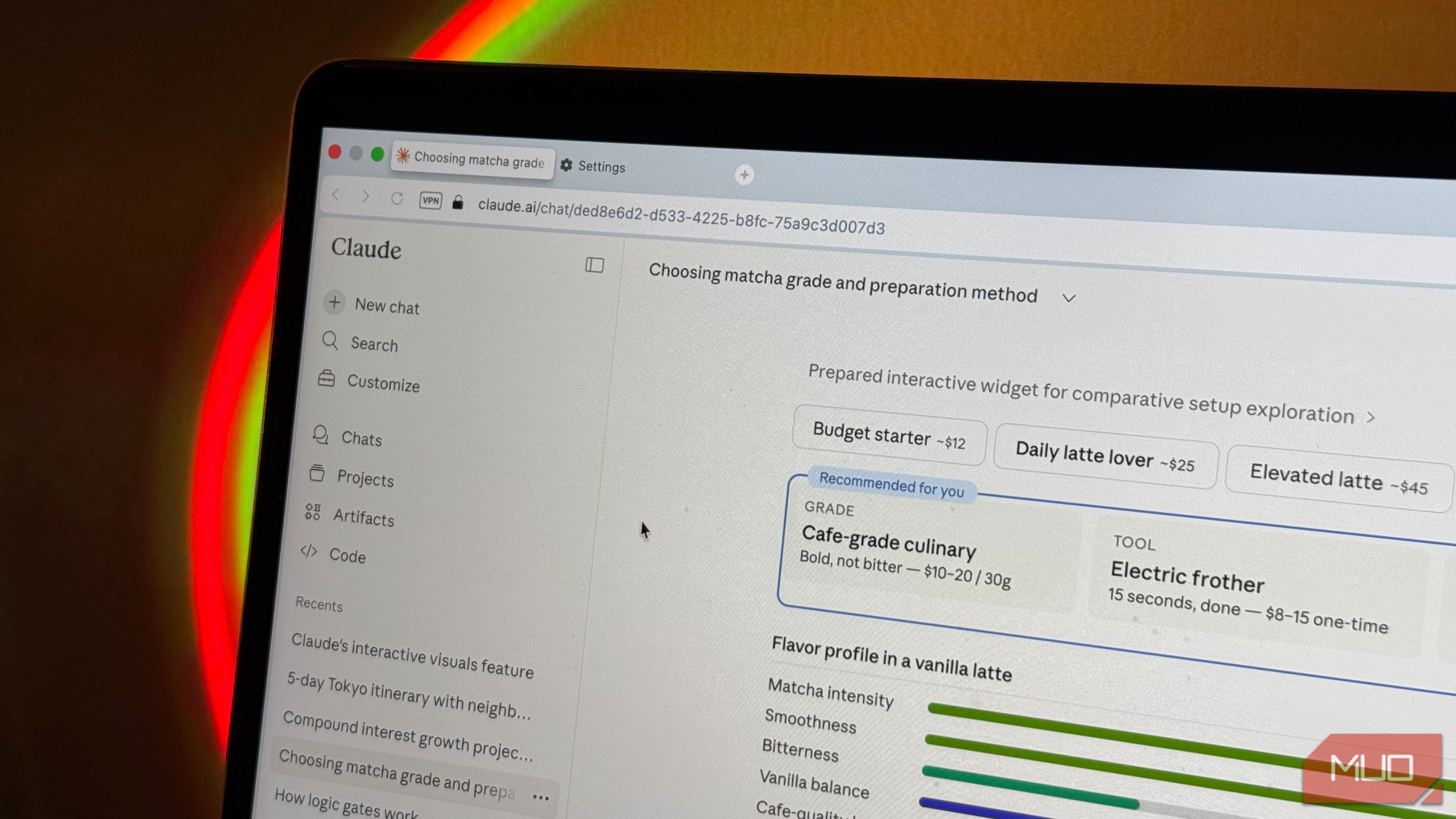
When I sent the prompt above, Claude generated a “Matcha Grades at a Glance” visual that broke down the different grades, their flavor profiles, and what each is best suited for. It showed ceremonial, premium, and culinary matcha, and even included the price range for each.
Next, it included a visual for preparation tools that broke down four tools by texture, effort, and cleanup. It then outlined the preparation method for lattes in a visual diagram and even highlighted the one it determined was best for me. Finally, Claude put together a “starter setup” visual for me that detailed the setup it recommended, the recipe I should follow, along with pro tips for a strong matcha flavor.
I then sent another prompt: “Let me toggle between setups to see what I’d need and how the results differ!” and it generated an interactive widget where I could flip through four setups and compare everything side by side.
5-Day Tokyo itinerary
Next up, I sent Claude the following prompt:
I have 5 days in Tokyo. Create an interactive day-by-day itinerary map showing neighborhoods, travel times between them, and what to prioritize in each area.
What I found super impressive with this example was that the visual was a fully interactive Google Map view centered on Tokyo. It showed all five days of my trip as a color-coded itinerary. There was a day selector at the very top to let me toggle between each day.
The stops for each day were numbered sequentially with pin markers placed on the actual locations across the city. Between each stop within a day, there was a transit route line drawn on the map, showing the actual path I’d need to take. Each pin was also clickable, and tapping one would open the place’s name, address, suggested arrival time, and insider tips from Claude!
This might just be the feature that sounds boring until you try it
AI image generation looks cool, but ultimately feels very gimmicky in day-to-day use. Interactive visuals, though, seem like a feature I’d genuinely want to see more and more in my responses from Claude.
If you’ve been sleeping on this one, open a new chat and just ask it to visualize something. You’ll see what I mean.
