


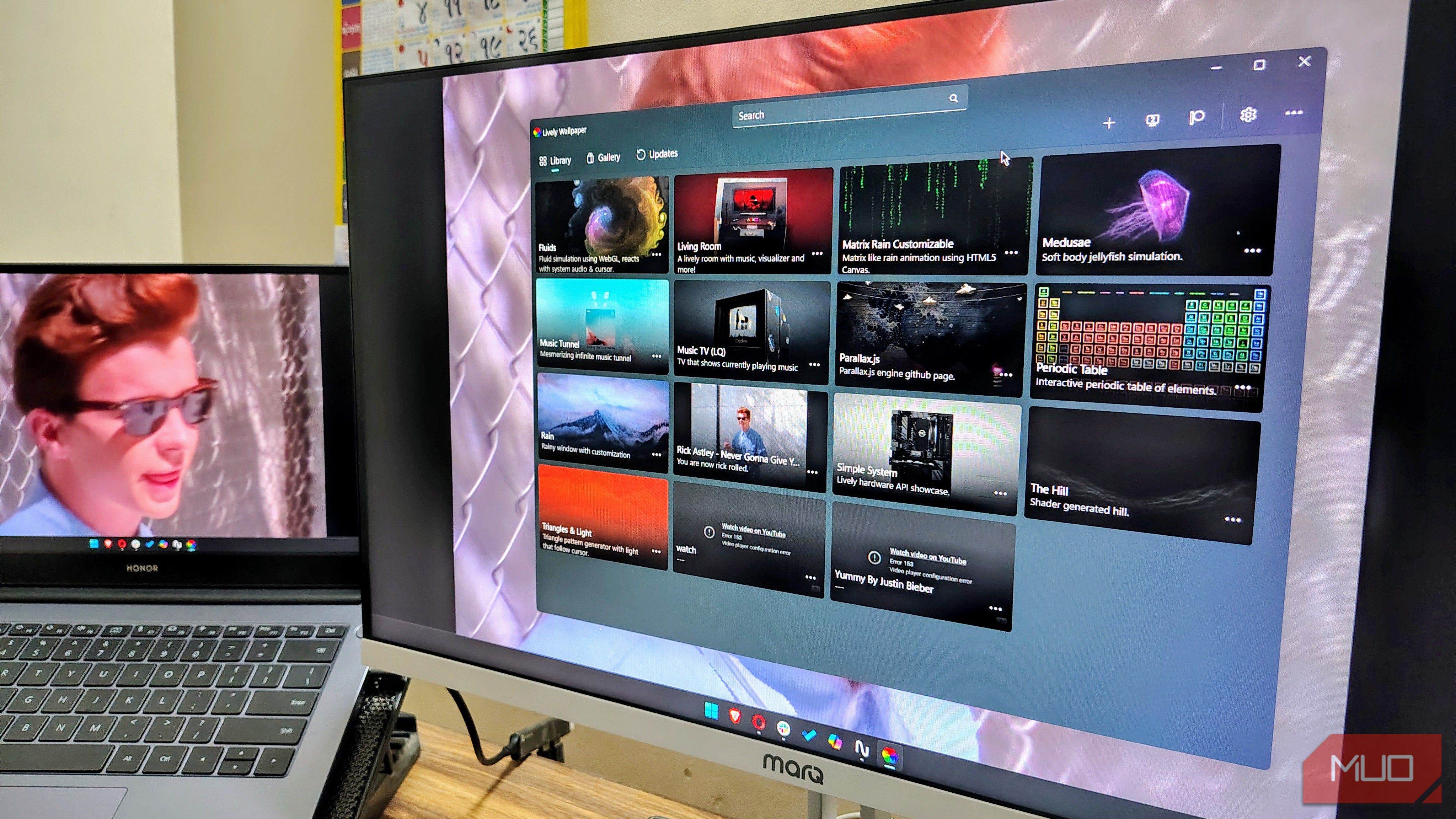
It’s 2026, and what did we bring along with us? Subscription fatigue and microtransaction burnout. We have to pay monthly for music, movies, cloud storage, and even a heated seat in our cars. And while Wallpaper Engine is technically a one-time $4 fee rather than a monthly tithe, it still begs the question: Why have we normalized paying for desktop wallpapers at all?
A while ago, I decided to cut down on paid apps I pay for and went with free, open-source app alternative. And I decided to start with my desktop’s wallpaper. I used to pay for the Wallpaper Engine just so that I could set the wallpaper the way I like. That’s when I installed Lively Wallpaper. It made me realize I don’t need to pay a dime just to put any wallpaper I want. It does it for free and often offers better performance and significantly more freedom.
OS
Windows
Developer
rocksdanister
Lively Wallpaper is an open-source engine that converts videos, GIFs, webpages, and shaders into dynamic wallpapers. It features drag-and-drop setup, hardware-accelerated playback, multi-monitor support, and customizable performance rules that automatically pause playback during full-screen applications to preserve system resources.
What is Lively Wallpaper?
An easy way to make your desktop attractive
Lively Wallpaper is a free and open-source Windows app that lets you set a custom wallpaper. It lets you upgrade your desktop experience without needing to open your wallet. Unlike many other “free” wallpaper apps that are mostly adware masquerading, Lively is a legit app with no ads or spyware, and its codebase is hosted on GitHub.
At its core, Lively is an engine that turns almost any dynamic media into a Windows desktop wallpaper. It supports videos, GIFs, emulators, HTML/CSS web addresses, shaders, and even games. Under the hood, it makes use of the Chromium Embedded Framework (CEF) to render web wallpapers and a robust MPV player for video files.
Lively’s framework delivers high performance across multiple video codecs and web standards without the bloat associated with proprietary engines. It effectively turns your desktop into a sandbox, removing the static limitations of a standard JPEG.
Why is Lively better than others?
The FOSS philosophy that makes the difference
For a pure, minimal, productivity-focused user, having to keep Steam running in the background just to render the desktop background is a massive inefficiency. It consumes RAM, and requires me to sign in.
Lively is standalone. Install it and forget about it. It answers to no one. Lively respects users’ preferences for owning the software completely, without any dependencies. Furthermore, the community-driven aspect means features are added based on GitHub requests and passion.
Better resource management
The biggest concern for power professionals regarding Lively Wallpaper is the FPS tax. Most people (including me) assume that running a 4K video loop while having other software and games like GTA V and Adobe Premiere Pro can take a toll on the system resources. But digging a bit deeper, I found out that Lively migrates this with what I like to call the 0% rule.
Out of the box, Lively is aggressive about saving resources. When you launch a full-screen app, Lively freezes completely in the background. In this state, it consumes literally zero resources. Essentially, it goes into a complete coma until you are back on the desktop. The rule is simple: if you are not looking, there is no point in letting the application run in the background.
Rules can be customized further in Lively’s performance settings. You can customize the rule to pause playback when the laptop is running in battery-saver mode. Or even when you access the machine via remote desktop. While Wallpaper Engine has somewhat similar settings, Lively’s implementation feels snappier and more to the point.
Anything is wallpaper
The one feature I like most about Lively wallpaper is its flexibility in input. In many ways, it’s much more flexible than some of its paid competitors. With Lively wallpaper, making your Windows PC stunning is easy. It accepts almost everything you throw at it via an intuitive drag-and-drop interface. Be it a YouTube video, a live webpage, or an interactive shader that runs on the GPU. You can set anything and everything as wallpaper.
The Steam Workshop advantage
But not everyone needs a workshop just for wallpaper
With Wallpaper Engine, finding a new background is as easy as clicking “Subscribe” on Steam. The library is vast, categorized, and vetted. Lively currently lacks a centralized, integrated store within the app. Finding wallpapers for Lively requires manual labor — scouring Reddit, DeviantArt, or YouTube for perfect video files.
Additionally, Wallpaper Engine has a robust mobile companion app for Android, allowing you to sync your desktop to your phone, a feature Lively is still catching up on.
Related
I made my second monitor twice as useful by adjusting these 5 settings
Open source or built-in software, and everything in between
On the other hand, Lively wants to rely on the community. There is a massive library, such as r/LivelyWallpaper, where creators share high-quality assets freely. If you know where to look or how to create a loop, you don’t even need a workshop.
Every piece of content on the internet is a wallpaper with Lively. The freedom to pull content from YouTube, web URLs, or local files without a proprietary subscribe button or having to enter your credit card information is a strength, not a weakness.
Customize your desktop without hurting your wallet
For those who want a one-click solution, Wallpaper Engine is a fine piece of software you can get for $4. It works, and that is why it’s popular. But for the users who want to take total control, spend $0, and have a setup that respects users, Lively Wallpaper is the way to go. It represents the spirit of PC modding perfectly: open, free, and incredibly powerful.
