


We all have smart homes these days. You don’t have to live in the smart home of the future either. Got a single smart bulb? You’ve got a smart home in my eyes. But I found that the more smart accessories and devices that I added to my own smart home, the more I wondered what it was all actually doing.
I’d heard horror stories of no-name Chinese smart brands phoning home to servers and doing who-knows-what. And while all the smart gear in my setup is from companies we’ve all heard of, I wanted to be sure. So I decided to take a dive into the murky world of my network data.
The result surprised me, and I think it might surprise you, too. It turned out that there was indeed one specific smart home accessory phoning home to a couple of servers more than I’d expected. So much so, in fact, that it was responsible for the majority of server requests across my home network. That accessory? The humble Ring Indoor Camera.
Related
I set up Pi-hole on my home network, and the internet feels like a completely different place
The many benefits of hosting your own DNS server and the control it gives you over your network.
Setting up my digital wiretap
It’s always DNS
When it comes to monitoring your network traffic, there are a few routes you can take. If you really want to dive into the nitty-gritty details, you can snoop the traffic itself. Tools like Wireshark can give you all the information you could possibly need, but it was overkill for what I needed. And I already had a tool in mind. A tool that I’ve been running all day, every day, for months.
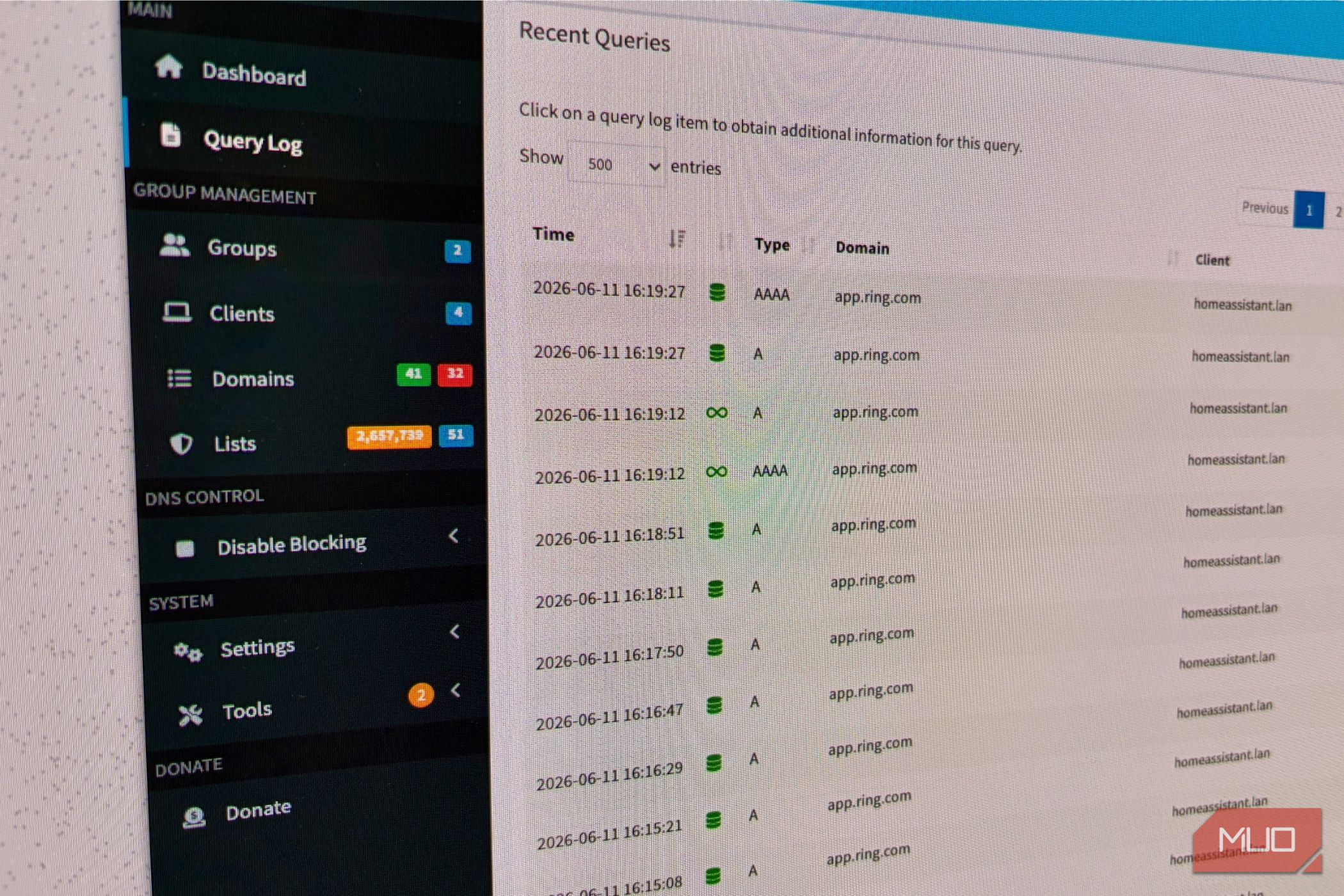
That tool is Pi-hole. I use Pi-hole, a self-hosted DNS service,to give me more control over how my devices handle DNS requests. It’s been great, too. Even better, it tracks all of the DNS requests made by the devices on my network. That made it the obvious place to go when I wanted to see which servers those devices were talking to.
As I write this, my devices have made over 131,000 DNS requests over the last 24 hours. The most frequent DNS request in those 24 hours? Api.ring.com. The second was another domain associated with the Ring API, while the fourth was app.ring.com. It’s fair to say there’s a pattern developing here.
Ring’s chatty API
My camera’s calling home
Hannah Stryker / MakeUseOf
As you’ve probably worked out by now, we have a Ring camera in this house. It’s a Ring Indoor Camera, specifically, and we use it to keep an eye on our dogs when we aren’t home. It takes the guesswork out of figuring out which one is responsible for the chaos we invariably find when we come home.
But where we do things a little differently is the way we actually use the Ring camera. We don’t use the Ring app, nor do we pay Ring for any of its services. Instead, we use a Home Assistant setup to make the camera support HomeKit Secure Video. That probably explains the DNS requests for Ring’s API. And sure enough, checking Pi-hole’s logs shows that the requests are coming from homeassistant.lan.
Once I realized my Home Assistant was making a ton of Ring API requests, I wanted to know why. And the clue can be found in one of the URLS in particular.
All signs point to live view functionality
Or just a live view of tons of DNS requests
Credit: Ring
The second most-requested DNS entry across my network is for api.prod.signalling.ring.devices.a2z.com. A swift Google suggests this URL is used for Ring’s live video feed. I found some reports of people blocking that specific URL and breaking that feature, so that seems pretty cut-and-dried to me.
In theory, that URL should be requested only when someone uses the Ring app to view a live camera feed. I also suspect that it would be used if a motion event triggers a recording. But I don’t use the Ring app or any of its motion detection systems, either.
Despite that, it’s clear that Home Assistant asks for the DNS entry for that URL somewhat aggressively. In a home of four people, Windows PCs, Apple laptops, multiple phones, and everything else that uses the internet, that URL is responsible for the second-most DNS requests on the entire network. It must be pretty important to Home Assistant.
OS
Windows, macOS, Linux, Raspberry Pi
Developer
Open Home Foundation
Price model
Free, Open-source
A self-hosted, open-source smart home platform that lets you control, automate, and unify all your devices locally without relying on the cloud.
An unfortunate necessity
For now, at least
Bryan M. Wolfe / MakeUseOf
When I actually put some thought into things, it all actually made plenty of sense. If I’m honest, it should have hit me a little more quickly than it did. But hey, I got there eventually.
For Home Assistant to pass the Ring’s feed into HomeKit Secure Video, it presumably needs to access that feed first. Mystery solved. We can all move on to something else.
Well, maybe. Because this all made me realize just how busy Home Assistant is and how active that Ring camera must be. For HomeKit Secure Video to record activity when it detects movement, Home Assistant must also capture live video 24/7. And it’s doing that via the Ring API 24/7, too.
I’m not sure how I feel about that. Ultimately, the answer might be to ditch the Ring camera for something that natively supports HomeKit Secure Video, eliminating the need for the Home Assistant intermediary entirely. I use Home Assistant for other things, so it’s going nowhere. But maybe it shouldn’t have 24/7 access to an indoor camera. Maybe it’s time to research proper HomeKit cameras. I know my network would thank me.
Related
I turned my old tablet into a smart home dashboard, and it’s perfect
I use my 1st-gen iPad Pro as a smart home dashboard
