


Most Obsidian vaults start with good intentions and end up as a graveyard of orphaned notes you’re too overwhelmed to revisit. You build folder structures that make sense in week one, add a tagging system over time, but you’re soon just spending more time deciding where a note belongs than actually thinking. You don’t need an app, just Claude like an assistant, and you’ll find the busywork is easy to handle.
Related
6 Reasons Why Obsidian Is My Go-To App for Deep Research Projects
Deep research feels lighter with Obsidian on hand.
The first method uses an inbox
The goal is to let the AI do the filing, not you
Jorge Aguilar / MakeUseOf
Most people who try to build a second brain in Obsidian eventually hit the same wall. They start with good intentions, like a folder for research, a folder for projects, a folder for ideas, and for a few weeks, it works. Then the folders multiply, the tagging system gets complicated, and maintaining the structure starts taking longer than actually thinking. The vault becomes another thing to manage instead of a place to think.
This approach throws that whole model out. There are no folders to maintain, no tags to apply, no metadata fields to fill in. The only thing you do is write your notes and drop them in one inbox folder. Everything else is Claude’s job, specifically through the desktop app, but don’t worry because you do not need a subscription to use it.
You create a single folder in your Obsidian vault called inbox. Every note you take goes there. That means unedited, unformatted, unorganized meeting notes, article highlights, half-formed ideas, and anything you read that felt important. You write them however they come out and drop them in.
Then you set up a Claude Project and point it at your vault. Inside that project, you tell Claude to read through everything in the inbox and look for threads and patterns across notes. It should identify where an idea from one note connects to something you wrote three months ago, and surface those connections in a single, readable summary. This should happen whenever you sit down to synthesize your thoughts.
You’re not asking it to find connections you already suspected. You’re asking it to find the ones you forgot you made, or never realized existed at all.
When you’re writing individual notes, you’re too close to each one to see how they relate. Claude isn’t. It can hold the full contents of your vault in view at once, compare notes across months, notice that the question you wrote down in February is answered almost exactly by something you captured last week, and tell you that.
It’s less than a summary and more of a website. All you have to do is write everything down and review it every so often.
The next method doesn’t need the desktop app
You can just drop a file into Claude instead
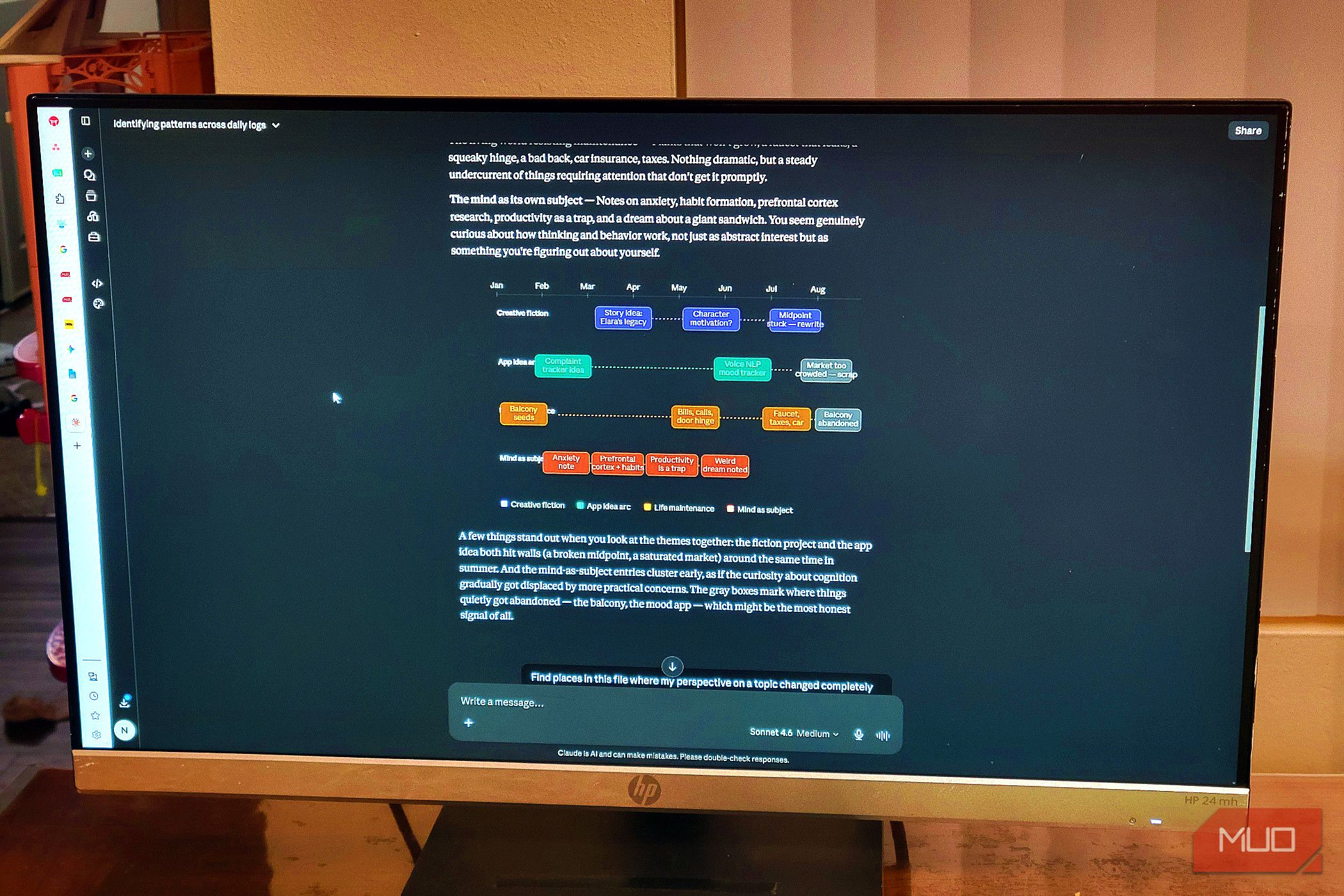
Another way to do this is by running your unstructured logs through Claude to find themes that stretch across months of work. To do that, you need to get around some practical limitations. Most web interfaces cap you at things like 20 files or 30MB per upload. The fix is simple. You just use a local script or a tool like Obsidian’s built-in export to merge your scattered markdown files into one combined text document.
With everything in a single file, you can drop it straight into Claude to do the heavy lifting. Depending on the model, that window handles anywhere from 200,000 to 1 million tokens, which is enough to take in hundreds of pages of personal notes in one go.
The best part is how Claude actually reads that material. Instead of just matching keywords, it understands meaning. So it can connect ideas across months of writing, even when you use completely different words to describe them.
A quick note from March about a character’s motivation might get linked to a frustrated July entry about a plot hole, even if those two entries use completely different words. That’s the kind of connection you’d normally have to make yourself, which means either remembering the earlier note existed or stumbling across it by accident.
To do this on your own, you’d have to manually create the links and remember your own past phrasing well enough to find relevant entries. Claude handles that by looking at the underlying meaning rather than the specific text, bridging the time gaps and shifts in wording that naturally happen when you write over a long stretch.
I think this method is a lot less reliable than the first because you’ve lost the separate documents. However, it is likely better for you if you don’t want to keep building up a bunch of separate documents.
Chatbots are good at handling this kind of work
Handing over the filing doesn’t mean losing the thinking
Jorge Aguilar / MakeUseOf
A lot of people feel uneasy about handing control of their notes to an AI. Tools like Obsidian were built on the belief that manually linking notes is part of how you actually learn, so outsourcing that process can feel like giving away something important.
When you’ve spent months carefully building a vault, it’s hard to find the energy to organize it. Once a knowledge base grows into thousands of files, it becomes too big for one person. You can’t remember every note, let alone connect every related idea by hand. What was supposed to help you think starts to stress you out instead, because you know that good ideas are sitting forgotten in a folder somewhere, quietly going to waste.
This is why automation helps. Instead of spending your time filing and tagging, you can just think and write. AI makes a great assistant to keep track of links and structure in a massive vault. It doesn’t forget to add backlinks, and it doesn’t get bored combing through months of old notes.
Feeding your scattered files into Claude isn’t the same as outsourcing your thinking. You’ve already done the thinking. You’re just using a tool to organize the raw material you’ve generated, pulling fragments together into summaries and concept pages that are actually easy to go through. The vault stays useful and alive, and you can write freely without worrying about where each note is supposed to go.
Use the AI to do the work you don’t want to do
Manually linking notes is part of the learning process, but it is tedious. If your vault has a few hundred files, and you have the time to tend it, this workflow might be more than you need. Spending hours backlinking isn’t deepening your thinking; it’s just housekeeping. So give it to Claude, because the chatbot was built to do this busywork.
OS
Windows, macOS, Linux, Android, iOS, iPadOS
Developer
Dynalist Inc.
Obsidian is a local-first, Markdown-based note-taking application that stores your notes as plain text files and lets you build interlinked “vaults” of knowledge. It supports plug-ins, graph visualisations, and full control of your data rather than locking you into a proprietary format.
