


Automation helps you complete your repetitive tasks automatically. I mostly rely on Samsung’s Routines to automate a few tasks, but you can only do so much with it. For instance, if I wanted to trigger Google Voice Assistant without using my voice, Routines can’t do that.
The app that finally was able to do it was Tasker. You use the Voice Command action in Tasker followed by the Say action that says your command out loud. Tasker can automate many of these annoying phone tasks, and now I can’t imagine using my phone without it.
Tasker is different from other automation apps
It uses real logic instead of simple if-then recipes
Tashreef Shareef / MakeUseOfCredit: Tashreef Shareef / MakeUseOf
Tasker is not the only automation app available for Android. There’s IFTTT, MacroDroid, and even Samsung’s own Modes and Routines. Most of these apps work on a simple recipe model: one trigger leads to one action. Connect to Wi-Fi, then do this. Reach a location, then do that. They’re useful, but they top out quickly.
Tasker is different because it actually uses logic. You can set multiple conditions and tell the app to respond differently depending on what’s happening on your phone. It watches over 130 different states and events, from your location to which app is in the foreground to whether the phone is charging. And when those conditions are met, you can trigger any combination of over 350 actions.
Unlike MacroDroid, which uses a simpler trigger-action-constraint model, Tasker lets you build if-then-else chains. You’re not just connecting a trigger to an action, but building small systems that respond to context. Everything runs locally on your device, too. Nothing gets uploaded unless you specifically configure it to, which is a nice change from cloud-dependent automation tools.
Using Tasker to automate tasks
Pick a routine, build a task, and set a trigger
Making your own automation in Tasker starts with picking a routine or an annoyance you want to control. You can build automations around any pattern in your day, whether that’s managing calls during work hours, dimming brightness at sunset, or putting your phone on silent for class without having to remember to toggle it back.
The basic workflow always comes down to two steps: creating tasks and setting a trigger to activate or exit those tasks. Tasks are the actions you want your phone to perform, and triggers are the conditions that start them.
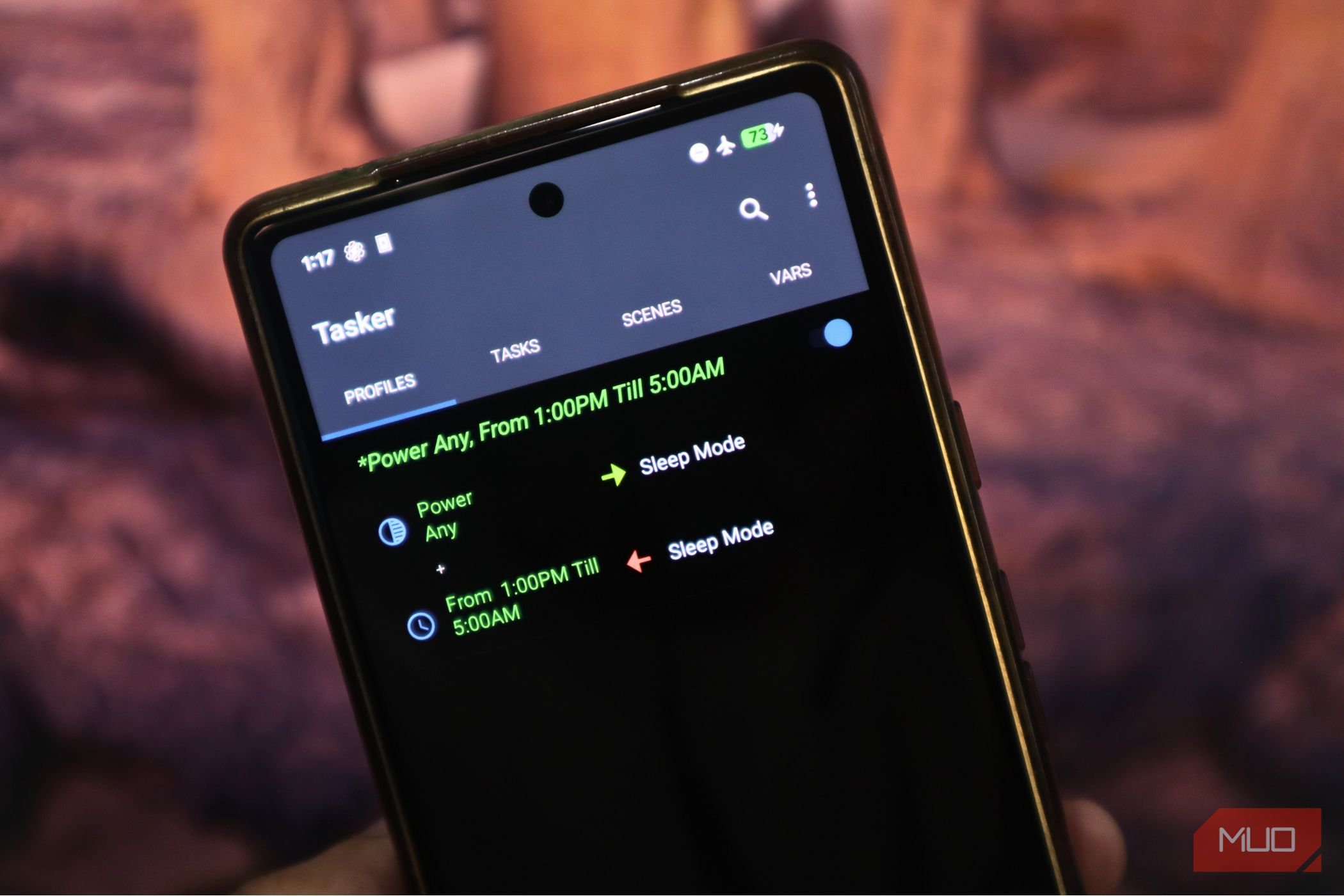
I started with a custom sleep mode automation. I set two conditions as the trigger: the phone being in an active charging state, and a specific time window from 9 PM to 5 AM. When both conditions are true at the same time, Tasker runs the entire task. If either condition stops being true, the automation exits. My other task includes turning on Do Not Disturb in alarms-only mode, toggling Wi-Fi off, switching on Airplane Mode, and enabling dark mode.
The key detail here is that I set all of these actions to toggle mode instead of a hard on or off. That means Tasker automatically reverses every change when the triggering conditions are no longer true. When I unplug, or the clock hits 5 AM, everything goes back to normal on its own. Here’s what I’ve set up so far:
- Auto-reply when driving: When my phone connects to my car’s Bluetooth, Tasker automatically replies to incoming messages with a canned “I’m driving and can’t respond right now” text. It stops the moment I disconnect.
- Low battery text to my partner: When my battery drops to 10%, Tasker sends an automatic SMS to a specific contact so they know my phone is about to die. No more “why didn’t you reply” conversations.
- Car parking notification: The moment I disconnect from my car’s Bluetooth, Tasker logs my GPS coordinates, timestamps the location, and sends me a notification. I can add a note or even take a photo of the parking spot from there.
- Sort my Downloads folder: Every time a new file lands in my Downloads folder, Tasker moves it into the right subfolder, whether that’s images, documents, APKs, or audio files. My Downloads folder used to be a mess.
- Flashlight brightness slider: On Android 13 and above, Tasker exposes the hidden flashlight intensity control as a floating slider whenever I toggle the torch on. I had no idea this was even possible.
- Important notifications on Always-On Display: I keep my AOD off to save battery, but Tasker turns it on whenever I get a notification from specific apps, like WhatsApp or Gmail. It switches back off after I dismiss the notification.
- Google Doorbell chime: Instead of relying on a silent notification when someone rings my Nest doorbell, Tasker intercepts the notification and plays a custom chime on my phone while opening the Google Home live feed automatically.
Tasker plugins add more power
Third-party plugins turn Tasker into a full automation hub
Tasker, on its own, is already powerful, but plugins take it a notch above. These are separate apps that bolt onto Tasker and expose entirely new capabilities, things the base app simply can’t do on its own.
Take AutoVoice, for example. It adds custom voice commands as Tasker triggers, including integration with Google Assistant. You can say something like “I’m home” and fire an arbitrary Tasker task, like turning on your smart lights or switching off Airplane Mode. AutoRemote adds a remote messaging channel so you can trigger Tasker tasks from another device, even a Windows PC running Cortana. AutoNotification lets you build custom, persistent notifications with buttons that directly run Tasker tasks.
Each plugin broadens what Tasker can listen to and what it can do. The developer’s site has dozens more, and the community regularly shares plugin-based profiles you can import.
Tasker has a learning curve
It’s powerful, but it takes time to figure out
Tasker is not easy to pick up. The interface is dense, the built-in documentation is minimal, and most real-world automations require trial-and-error rather than following a clear walkthrough.
Unlike IFTTT’s curated recipe gallery, where you just toggle a preset, Tasker expects you to design your own automations from scratch. That means understanding the difference between profiles, contexts, tasks, actions, and variables, and how they all fit together. You don’t need to be a programmer, but you do need to think in terms of triggers, conditions, and execution order.
The community helps a lot here. There’s a large library of pre-made profiles you can import and tweak, and the Tasker subreddit is one of the more active automation communities on Reddit. But even importing someone else’s profile usually means reading through it, understanding the logic, and adjusting it for your setup. It takes time.
OS
Android
Developer
joaomgcd
Tasker is a feature-rich Android automation tool that allows you to build personalized profiles, actions, and triggers. It is the go-to app for users who want deep customization and full control over their device.
Tasker is the ultimate Android automation app
Tasker is a paid app that costs about $3.49; it has a dense interface, and Android’s own permission restrictions mean you’ll occasionally need to grant extra access through ADB or helper apps. And if you are someone who just wants to silence their phone at bedtime, Samsung Routines or MacroDroid will do the job faster and easier.
But if you’ve hit the ceiling on what built-in tools can handle, Tasker is probably the answer. It’s the only Android automation app I’ve tried that genuinely scales with how complex your needs get. Start with one annoyance, build one profile, and see if it clicks.
