

Elyse Betters Picaro / ZDNET
Follow ZDNET: Add us as a preferred source on Google.
ZDNET’s key takeaways
- An old Android phone can work like a DIY streaming device.
- Native casting is smoother than full-screen mirroring.
- A TV-style launcher makes streaming apps easier to browse.
After 15 years of testing devices, I have far too much old tech sitting in totes and drawers around my house.
I keep things like phones longer than I should because there’s always a tiny voice in the back of my head wondering if they’ll be classics one day or, just maybe, if I could still find uses for them. Heck, I recently turned an old Android phone into a Wi-Fi extender. That little project got me thinking about some of my other phones and realizing I really should do something with them.
Then it hit me: Could I turn one into a DIY streaming stick, like a Roku or Fire TV?
Also: I started clearing my Roku cache, and it fixed my biggest TV complaint
To be clear, I’m talking about turning a phone into a wirless streaming device or command center. One place where all my streaming apps live, complete with a TV-style UI, video casted to the big screen, and my phone acting as the remote. Turns out, this is easy to do and takes only minutes to set up. You could even plug directly into HDMI for a wired connecton, if you want.
How to turn your Android phone into a Roku or Fire TV
What you’ll need: A spare Android phone, an internet-connected TV or display that supports casting or screen mirroring, a charger, a launcher, and maybe a dedicated casting app. The phone should run a relatively recent Android version, have Wi-Fi, enough storage for streaming apps, and a decent battery.
Also: I replaced my bedroom TV with this $170 Roku projector, and it’s a worthy alternative
First, I connected my Android phone to my home Wi-Fi and made sure my TV was on the same network.
Show more
Elyse Betters Picaro / ZDNET Elyse Betters Picaro / ZDNET Elyse Betters Picaro / ZDNET
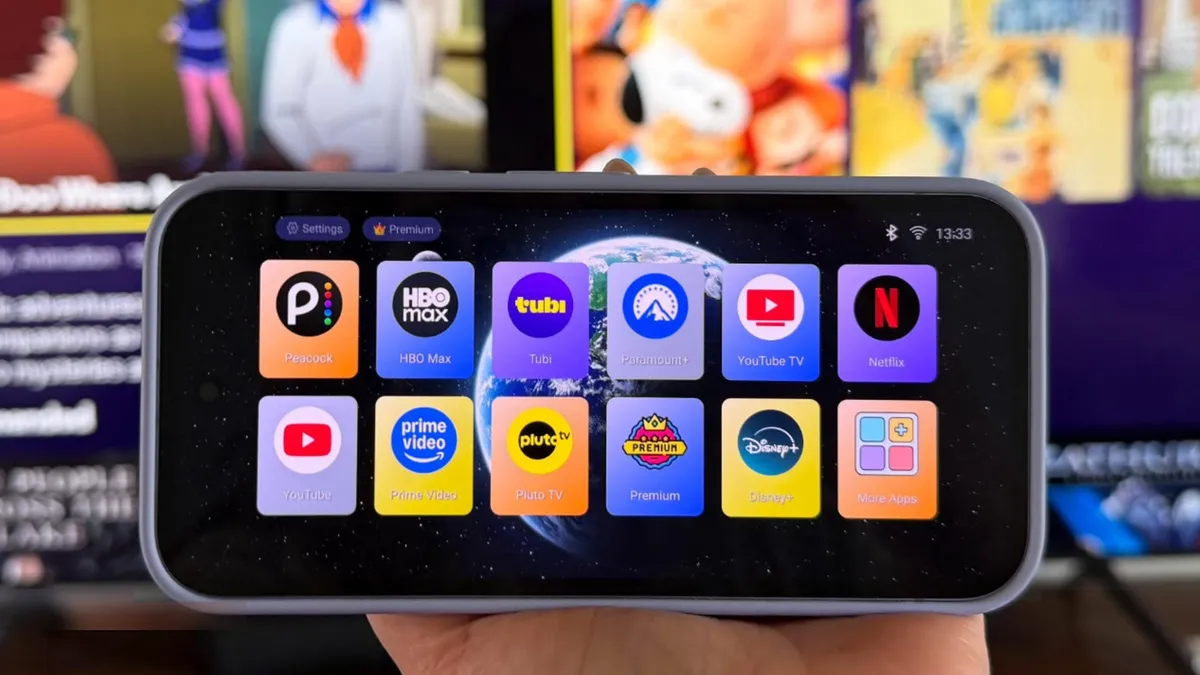
Here’s where things get interesting. I decided to use a launcher to replace the standard Android home screen on my phone with a more TV-like interface. This is what makes the streaming apps on my phone look like a Roku or Fire TV. I installed TV Launcher for free, but there are other launchers in the Play Store, such as Projectivy Launcher, Easy TV Launcher, or ATV Launcher Pro for $2.99.
Once installed, I customized how my streaming apps were organized. TV Launcher is cool because the app icons appear as large, rounded tiles in a simple row or grid, with colorful artwork and a clean look that makes the apps much easier to spot from across the room. I can hide or arrange the apps and even make folders.
Also: Own a Fire TV? Changing these 10 settings made my system run like new again
Show more
Elyse Betters Picaro / ZDNET
Since I’m using my phone to stream, I need to change its settings so the screen doesn’t time out or go dark while casting.
Go to Settings, then Display, and increase the screen timeout to 30 minutes or more. For a more permanent solution, I enable Developer options by going to Settings > About phone, then tapping Build number seven times. Then, under Developer options, I can turn on Stay awake so the screen remains on while charging.
Finally, I keep the phone plugged into a wall charger during playback so it doesn’t die halfway through a movie.
Show more
Elyse Betters Picaro / ZDNET
When I’m ready to stream, with my launcher open, I go to Quick Settings on my Android phone and tap Cast. (Some phones may call it Screen Cast or Smart View. If missing, tap the pencil icon to edit Quick Settings and add it.) With a launcher, my streaming apps are big. I can browse, pick something, tap play from my phone, and watch away on the big screen.
I found native casting often works better than full-screen mirroring. So, if a streaming app has a cast icon, I usually tap that to send the video to the TV and then use my phone as the remote. It results in smoother playback, less battery drain, and fewer audio delays.
There are dedicated casting apps that make it easy to cast videos and movies from a mobile device. Castify, for example, is free with ads, or there is an optional ad-free upgrade. Web Video Cast is another free option with a premium upgrade tier. It’s useful for any videos I want to watch from a site, like CNN, instead of in a major streaming app, and it supports local files and subtitles.
Also: Slow Fire TV? This quick 30-second fix made mine run like new again
Tip: A wired HDMI connection would make your phone-to-TV streaming experience more lag-free, by sending video directly through a cable instead of relying on Wi-Fi, but only some Android phones support it.
Show more
Elyse Betters Picaro / ZDNET
How I use my Android phone like a streaming device
For my setup, I used a Pixel 9a, which was released in 2025 and has 128GB of storage and 8GB of RAM, paired with an 85-inch Samsung 4K TV. Once my launcher was set up, my streaming apps were installed, and I decided how I wanted to cast, I was good to go. I just grabbed my phone with the launcher open, picked an app and then show, casted, and controlled playback from my phone.
Some DRM-protected apps may block screen mirroring from Quick Settings but still allow casting from inside the app. Support varies by app and plan, but many services offer native casting, including Disney+, Max, Prime Video, Peacock, YouTube TV, and Tubi.
Also: How to clear your Android phone cache – the 30-second routine every user should be doing
In my experience, this setup is simple and pretty fun to try. Do I plan to use an Android phone as a streaming device all the time instead of an actual Roku or Fire TV? At home, probably not. But for travel, like in a hotel or Airbnb, I can see the appeal. If nothing else, it was interesting to dust off an old, spare phone, do something new with it, and give it a surprisingly useful second life.
Can my Android phone really replace a Roku or Fire TV?
Mostly, but not perfectly. It can act as a streaming device and remote and takes only a few minutes to set up. However, wireless casting can lag, and some streaming services support native casting but block full-screen mirroring. That’s why a streaming app may cast normally through its own Cast button but show a black screen, error message, or no video when mirrored.
Also: This silent Android feature scans your photos for ‘sensitive content’ – how to uninstall it
What is native casting vs. full-screen mirroring?
Native casting sends the video stream directly to the TV and lets the phone act as a remote, while full-screen mirroring duplicates everything on the phone screen onto the TV. That means using the phone while mirroring also shows those actions on the TV.
Is this setup really free?
Yes, if you already have the Android phone and TV, use a free launcher, and plan to stream from an ad-supported service such as Tubi. In that case, you won’t even need to pay for the movies and shows you want to watch.
Is wired HDMI better than wireless casting?
Wireless casting is easier, but wired HDMI can reduce or eliminate lag, especially if your connection is spotty.
How to turn your old Android phone or iPhone into a security camera – in 4 easy steps
To see if your Android phone supports video out, plug in a USB-C to HDMI adapter, connect it to your TV with an HDMI cable, and choose the correct TV input. If nothing appears, your phone probably doesn’t support wired video output. Many Samsung phones support wired HDMI, as do Pixel 8 and newer models, and some Motorola Edge phones.
Can my Android phone stay plugged in all the time?
It’s not great for the battery. I suggest using a well-reviewed charger, keep the phone ventilated, and unplug it when not in use.
Show more
