

Sanuj Bhatia / Android Authority
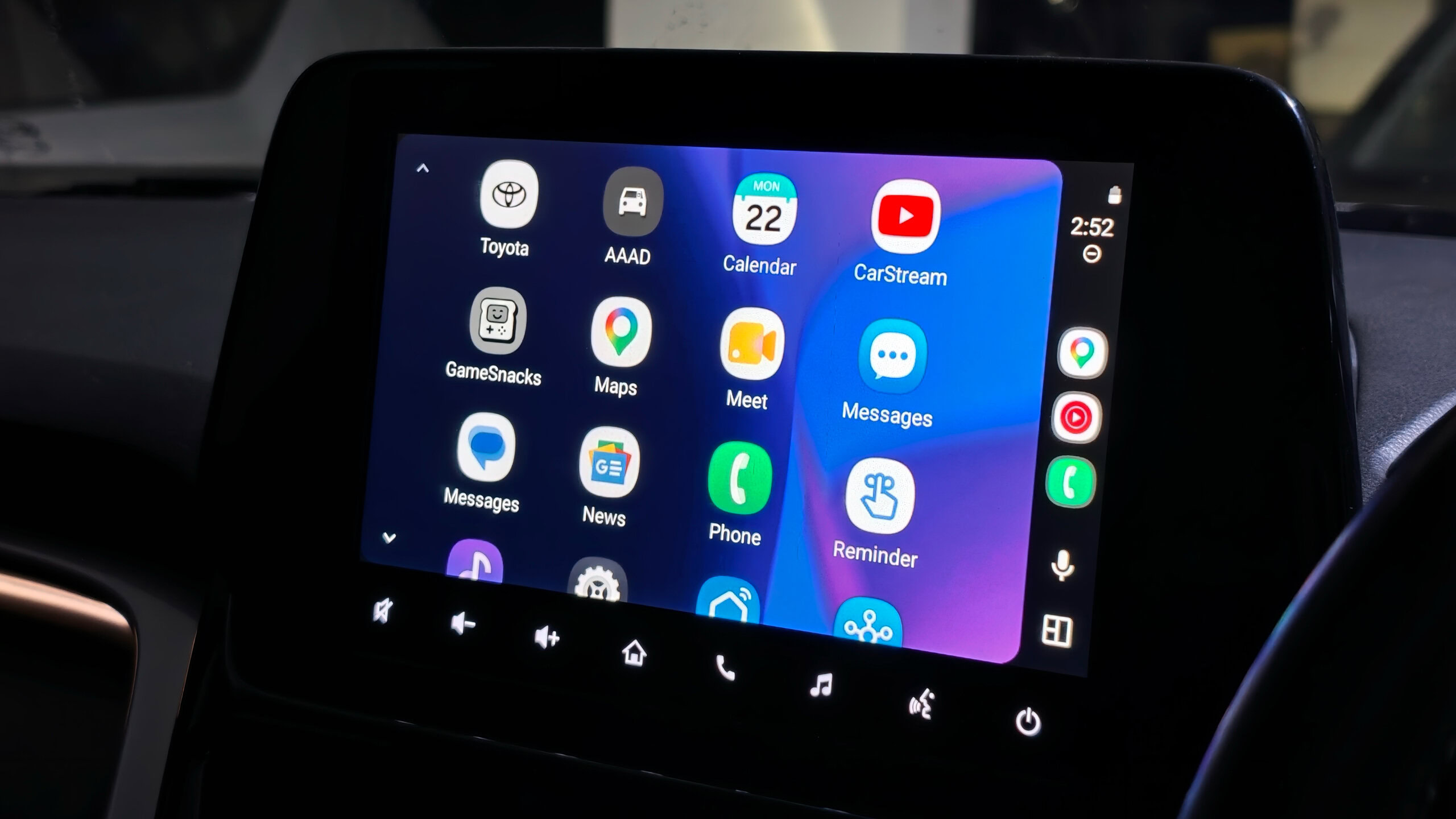
I’ve seen plenty of people get deeply invested in Android Auto, but I never really did, because I assumed it was little more than a navigation system and a media playback controller. Sure, you can have messages read out or take Google Meet calls on it, but that felt like the extent of it. Whatever Google enables, that’s what you get.
But I recently found out that isn’t quite the case. You can go far beyond what Android Auto offers out of the box and even install third-party apps outside of the Google Play Store.
Google places hard limits on what Android Auto can do, but it’s capable of much more. Here’s how you can sideload third-party apps onto Android Auto and make it far more useful than what Google ships by default.
Would you sideload apps on Android Auto?
12 votes
Yes, already have
42%
Tempted, but nervous
8%
No, not worth the risk
8%
I didn’t know you could
42%
I had no idea you could sideload apps on Android Auto, but it’s easy to do
Sanuj Bhatia / Android Authority
I’m sure most of you have used only the apps on Android Auto that Google provides out of the box, like YouTube Music, Spotify, Google Maps, the phone app, and so on. But I’m willing to bet you’ve also wished you could just play a YouTube video or stream an episode of a show while stuck in traffic.
A few days ago, I found out you can actually sideload apps onto Android Auto, and the process is surprisingly straightforward. You don’t need to root your phone or do anything particularly complicated. The steps can be broken down into three simple parts.
Step 1. Enable Developer Mode on your Android phone
First, you’ll need to unlock Developer Mode on your Android phone. Head to the Settings app, go to the About section, and tap the build number seven times. Once done, you’ll get a toast notification confirming that Developer Settings have been enabled.
Step 2. Unlock Developer Mode for Android Auto
Sanuj Bhatia / Android Authority
Next, you’ll need to enable installation of apps from unknown sources within Android Auto, and that’s only possible once Developer Mode is active.
To do this, go to Settings, select Apps, and then select Android Auto. On the Android Auto app info page, tap Additional settings in the app. On the next screen, scroll all the way down to the Version and permissions info section and tap it ten times.
Once enabled, you’ll get a toast notification confirming Developer Mode is unlocked for Android Auto. Now tap the three-dot menu in the top right and select Developer Settings. From there, scroll to the bottom and enable Unknown Sources.
Step 3. Install AAAD
Sanuj Bhatia / Android Authority
The final step is installing an app called Android Auto Apps Downloader (AAAD). This app essentially serves as an unofficial storefront for third-party Android Auto apps, letting you download and install them directly on your phone so they appear on your car’s screen.
Since AAAD isn’t available on the Google Play Store, you’ll need to download the APK from the developer’s GitHub releases page and install it manually. It’s worth noting that there are known issues with Google Pixel, OnePlus, Realme, and Oppo devices. For those, the developer offers a separate fix you’ll need to install as well.
You may also need to allow installation from unknown sources on your Android phone to get this working.
Sanuj Bhatia / Android Authority
Once AAAD is installed, open it and go through the setup process. You’ll need to grant a few permissions along the way, including unknown app installation, notifications, and disabling Google Play Protect.
One more thing: the free version of AAAD limits you to installing one app every 30 days. You’ll likely want to grab the Pro version, which unlocks unlimited downloads for a one-time payment of $4.
Android Auto suddenly became far more capable than I expected
Sanuj Bhatia / Android Authority
Once you have access to AAAD, you’ll be able to download all the third-party apps that developers have built for Android Auto. This means your car’s Android Auto can now do a lot more than what Google officially offers.
One of the best apps, in my opinion, is CarStream, which unlocks the ability to watch YouTube videos on your car’s screen. Google is bringing native YouTube streaming to Android Auto in supported cars from BMW, Ford, Hyundai, Kia, Mercedes-Benz, and others later this year, but that’ll only work when the car is parked.
CarStream works even when the car is in motion (which, of course, you shouldn’t be doing in the first place), and it lets you watch YouTube videos on your car’s screen just like any other display. The interface is easy to navigate using your phone, and you can use your phone’s keyboard to search. You can also sign in with your Google account to access YouTube Premium features.
Sanuj Bhatia / Android Authority
Another app I found pretty useful is one called AAMirror. It lets you mirror your Android phone’s screen directly onto your car’s dashboard. That might sound unnecessary at first, but it’s actually handy for playing videos saved on your device or streaming content from a web browser.
Although if I were downloading just one app from the third-party store for Android Auto, it’d be Fermata Auto. It’s an all-in-one multimedia app that covers pretty much everything: streaming YouTube videos, playing locally stored videos, screen mirroring, watching TV via IPTV links, and even running a web browser on Android Auto.
Sanuj Bhatia / Android Authority
Through that browser, you can access services like Prime Video and Netflix directly on your car’s screen. It’s pretty much a one-stop shop for all the multimedia features you would want on your Android Auto unit.
That said, is installing third-party apps on Android Auto actually a good idea?
Should you sideload apps on Android Auto?
Andy Walker / Android Authority
So, is this something you should try yourself? Probably not.
There’s a reason Google doesn’t officially allow most of these apps on Android Auto. They can be distracting, and watching videos or browsing the web while driving is a terrible idea. There’s really no argument around that.
Sure, finding out that Android Auto can run YouTube, a web browser, and even screen mirroring completely changed how I look at my car’s display. But honestly, most people are perfectly fine using Android Auto exactly the way Google intended. Maps, music, calls, messages, and that’s about it.
Most people should probably never install these apps. That doesn’t make them any less fascinating.
It’s also worth noting that Google regularly patches sideloading apps on Android Auto. If you do end up paying for AAAD, it might stop working before you even get much use out of it. Furthermore, there’s a 50-50 chance that the recent Android update on your phone has already patched things out, which might prevent any of this from working to begin with.
So, again, to be clear: sideloading apps on Android Auto is possible, but I wouldn’t recommend it for most people. It’s a fun thing to know about, but probably best left as just that.
Thank you for being part of our community. Read our Comment Policy before posting.
