

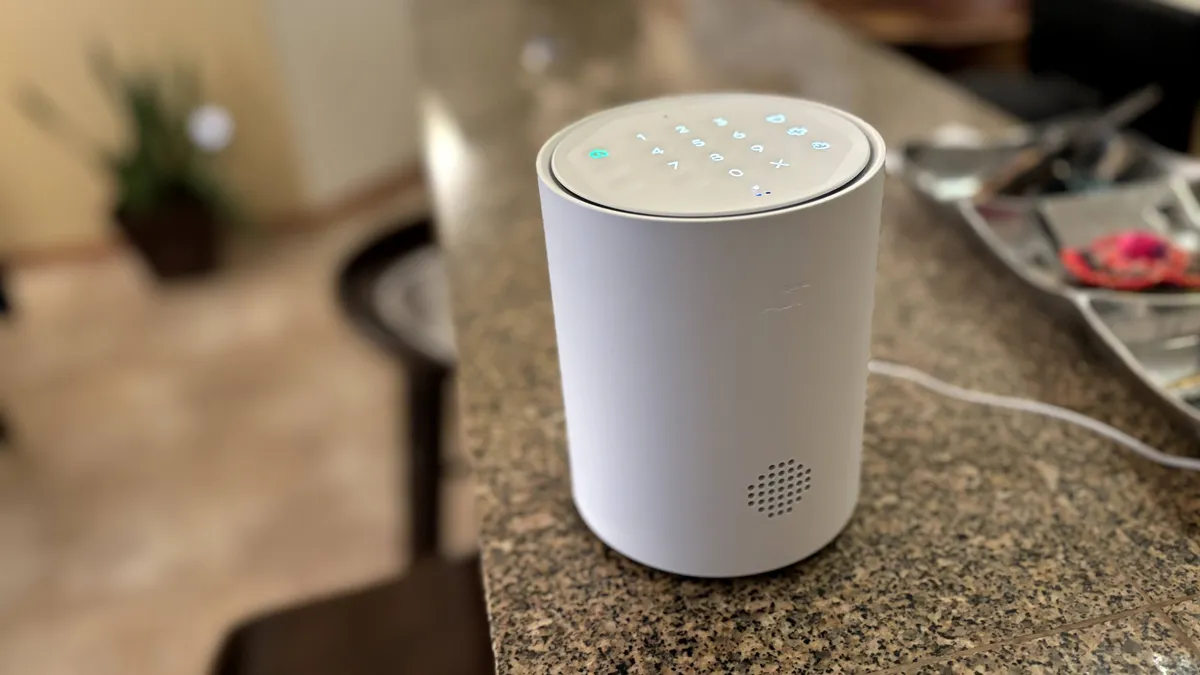
SimpliSafe home security systems can be easily tailored to your needs. Just add or subtract hardware and equipment as you please.
When choosing a home security system for your home, you may be tempted to start by deciding between a DIY setup or professionally installed systems with monitoring services. Remember to make your decision after considering the equipment, installation, monitoring options and other features you want. Here are some bits of information to keep in mind about these parameters when shopping around.
Equipment choices
Do you just need to keep watch over your entryways? A good video doorbell for your front door and an outdoor camera covering the back may be all you need; easy to install and monitor yourself. If you want to keep closer tabs on your home inside and out with 24/7 monitoring and quick access to emergency response services, you’ll want a more robust system. DIY and professional brands offer home security bundles with most, if not all, of the equipment you’d need to get started and the ability to add single devices as needed.
Smart home and AI
Most home security devices are compatible with Alexa and Google Home smart hubs, but if you prefer Apple HomeKit or another smart home ecosystem, you may have to do a bit more shopping and comparing to find a system compatible with your existing smart home devices. Don’t fret over compatibility too much as Matter is making it easier to connect previously non-compatible devices (although it hasn’t quite come for security cameras yet).
Smart home features are also always changing, especially with AI. Just in the past two years, SimpliSafe has added AI face and movement detection to help its monitoring agents, ADT has added support for Nest’s familiar face AI recognition features and Arlo has increased services to include AI detection of fires, barking, screaming and more. You’ll have to pay a lot more for these features and consider your own privacy if you’re interested in the cutting-edge upgrades.
Arlo’s new Security Tag is a great fit for its super-compact home security system.
Installation
Keep in mind all that equipment will need to be installed. While there isn’t much to installing a security camera or even a wired video doorbell, whole-home systems can be a bit more demanding to install and set up. Some are DIY-friendly and use adhesive to position devices without leaving permanent marks but not all systems do this. If you’d rather leave that to an expert and have them walk you through how to use the system, a professional home security service may be the way to go.
Monitoring and alerts
Virtually all home security systems allow for self-monitoring, likely via an app on your phone. They’ll also send you push notifications when there’s an event, such as when a package is delivered to your doorstep. Basic sensors can send alerts about what specific sensor was triggered or tampered with, while adding a camera allows for more complex recognition. You can customize these alerts to get only the information you want (such as only when a person is detected), while most will automatically ignore things like vehicles.
SimpliSafe remains a top DIY security system.
Professional monitoring and emergency features
Consider whether you want to be in charge of all the monitoring or if you’d like some support. Most systems allow you to add a professional monitoring plan, some even require it from the beginning. These services often cost more than $30 per month and sometimes much more if AI features are added.
More advanced features, such as facial recognition, glass break sensors and communication with emergency services may not be available from all manufacturers and devices. Consider the level of monitoring you want, and who you want to do it, along with the emergency response options, when choosing a home security system.
Expandability
Most home security systems allow you to buy single sensors or compatible devices and add them, one at a time, whenever you want to upgrade or address a specific problem. But they go about this in very different ways. Some only allow you to purchase its own brand devices, while others are compatible with a variety of third-party smart home devices. Some have very limited add-on options, while others have many choices. No matter what you decide, we recommend checking out the add-on options on a security system website to see what potential upgrades will look like.
” that you can tap on the company’s keypad to arm and disarm your security system.” image-credit=”Kangaroo” image-alt-text=”Kangaroo keypad plus Roo key fob” image-filename=”houston-in-context-square.jpg” image-target-url=”” image-credit-url=”” image-width=”3355″ image-height=”2543″ image-date-created=”2021-07-01″ image-do-not-crop=”true” image-watermark=”true” ng-block=”{“id”:”km1dy196cy657uq”,”type”:”image”}” edition=”us”>
Initial costs
We listed “cost” last for a reason. A complete home security system will likely cost you at least a couple of hundred bucks, so be prepared for that. There’s the potential to spend a lot more on equipment or a lot less. Also, keep in mind that the size of the system greatly affects the cost. Starter systems like many we listed here typically cost between $150 and $300, and allow you to add other compatible devices over time. Larger systems with 10 devices or more will cost at least several hundred dollars and can go up to $1,000 or more, depending on the tech that’s included.
Ongoing costs
Ongoing costs can carry a bit more weight when choosing the best security system. Expect ongoing monthly fees from a professional service and possibly a contract to lock you into those fees for a year or two (although we favored picks without a required contract). Signing a contract may not be ideal, but it may also come with free equipment or installation and lower upfront costs.
If you’re comfortable with self-monitoring, DIY systems may not come with any ongoing costs. Monthly subscriptions (without a contract) for cloud storage, enhanced features and possibly even professional monitoring are typically an option with DIY systems, often for lower monthly fees than professional services.
You’ll be alerted every time this door is opened.
Privacy and security
Always look for a brand that’s going to keep your data safe and has a good track record of security, encryption and protection against data breaches. That’s not always easy — many security companies have had issues in the past with breaches, privacy violations or even employees spying through home security cameras.
We look at a company’s current practices, track record and how they’ve been improving in the past few years when making recommendations. SimpliSafe is consistently one of the standout performers in security, which is one reason they earned a top spot on our list. While Ring has had missteps in the past, it’s improved in recent years and has even retracted its policy on providing police with video footage, so we feel comfortable recommending Ring at this time.
