


As the name suggests, Home Assistant was designed for smart home automation. It’s a powerful tool for automating all the smart devices in your home. To my surprise, some of the best ways that I use Home Assistant have nothing to do with my smart home at all.
Getting my wife’s attention
This is possibly my favorite Home Assistant automation, and it’s completely unrelated to controlling my smart home. Instead, it solves a real-life problem that bugged me for years until I built my own solution using Home Assistant.
Whenever I tried to get in touch with my wife for something important, she would always miss my calls or messages because her phone was on silent, and she didn’t feel it vibrating. The reverse was also true; I would regularly miss important messages and calls from her.
You can use the Emergency Bypass feature on an iPhone to allow specific contacts to override silent mode. However, this is a permanent override, so every call or message will come with audible alerts, which isn’t what either of us wanted.
Home Assistant lets you send notifications to a phone as critical alerts. These notifications can override silent mode and Do Not Disturb settings to play a loud notification sound. This turned out to be the perfect solution.
I created a shortcut on my phone that asks for message input and then sends that message to my wife as a critical alert via Home Assistant. The message arrives on her phone and plays a loud, extended notification sound, even if her phone is on silent. She has a similar shortcut on her phone that sends a critical alert to my device.
It works incredibly well. We almost never miss important messages from each other anymore, and what was once a source of regular irritation is now a thing of the past.
Related
4 Home Assistant blueprints that saved me hours of effort
You don’t need to reinvent the wheel.
Medication reminders
This is another case where I couldn’t find an app or service that did exactly what I wanted, but using Home Assistant, I was able to build the specific features that I needed. I have to take medication every day for a couple of health conditions, and I tried using dedicated medication reminder apps as well as Apple’s own Medications app. Even when using them, there would be days when I forgot to take my pills.
The main problem was that I take my medication in the evenings, and when I was out, I’d have to turn off the notifications from the reminder apps so that I wouldn’t keep disturbing everyone around me every 30 minutes with a full-volume notification sound. When I got home, I’d have completely forgotten about taking them.
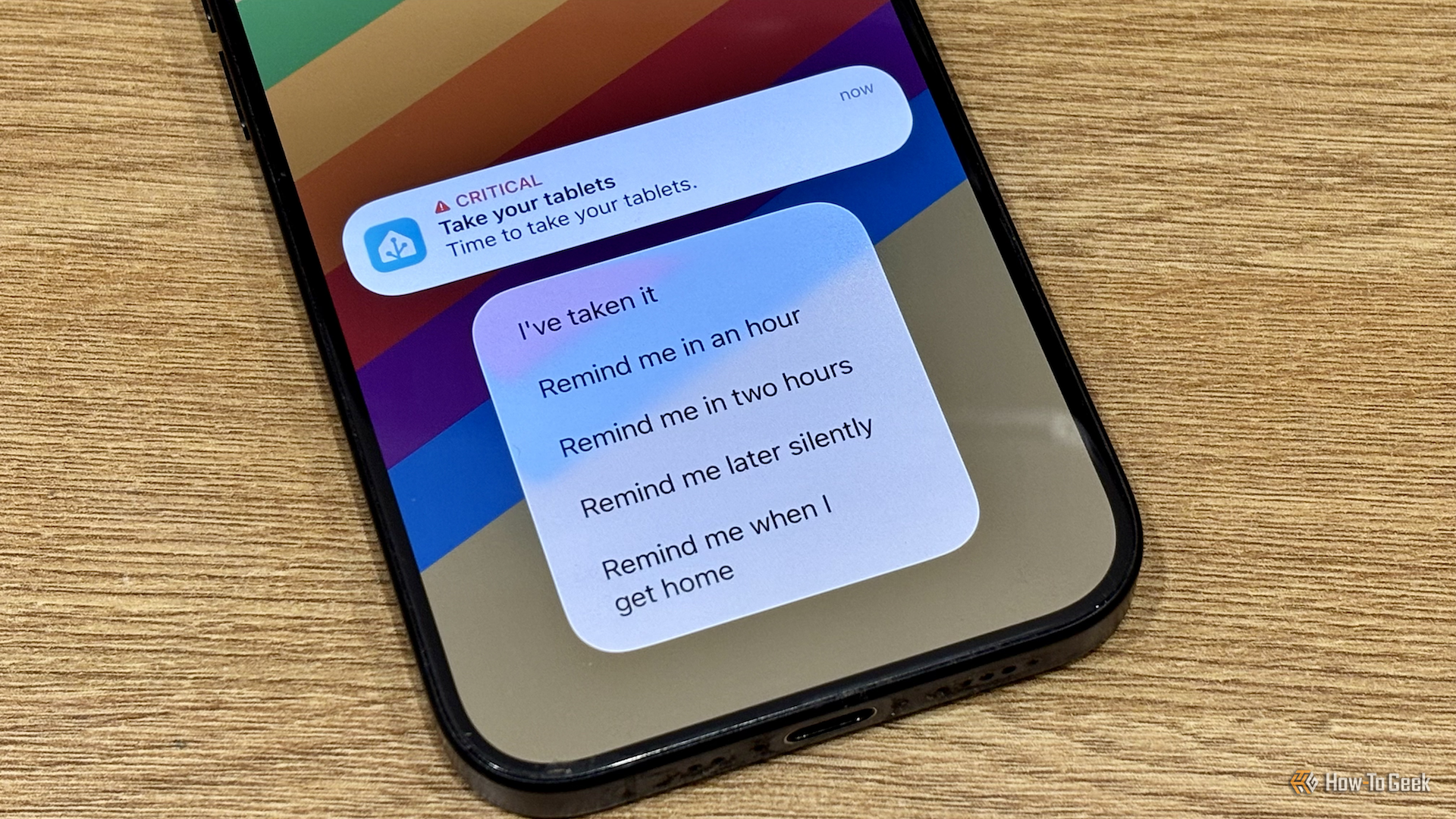
I created my own medication reminder tool using actionable notifications in Home Assistant. Every evening, I get a critical alert reminding me to take my pills. It’s an actionable notification, with options to remind me in an hour, remind me in two hours, remind me silently, or remind me when I get back home. If I don’t select any of the options, I automatically get another critical alert every 30 minutes until I tap “I’ve taken it” in the actionable notification.
The most useful part is the option to remind me when I get home. It stops reminders while I’m out, and as soon as I get back home, geolocation triggers another critical alert reminding me to take my pills. Since setting it up, I haven’t once missed taking my medication.
Tracking my kids’ chores
Getting my kids to help out with chores around the house had always been something of a chore itself. I wanted to try to find a way to gamify things so that they’d have an incentive to get their chores done instead of us just nagging them all the time. Setting up a chore tracker was exactly what I needed.
There are several ready-made chore trackers that other Home Assistant users have created. I used the KidsChores custom integration because it seemed like the one that would appeal to my kids the most.
Credit: Adam Davidson/How-To Geek
Now my kids have chores to complete each day that can earn them coins. They can trade coins for candy on a Friday or save up coins to trade for a toy or other gift from the store. They can also lose coins for really bad behavior.
The chore tracker is a big hit. The kids love being able to mark their own chores off on the dashboard, and for us, it’s easy to approve chores only once they’re done properly. It’s been a real win for both parents and kids.
Keeping me focused while working
This is probably the most effective thing that I’ve ever done in terms of improving my productivity. One of my biggest problems is that when I’m researching an article, I’ll end up going down a rabbit hole about some obscure Home Assistant trigger or niche smart home sensor, and waste a ton of time reading about things that aren’t necessary for my article.
Credit: Lucas Gouveia/How-To Geek | vander/Shutterstock
I wanted to try to find a way to snap myself out of these situations, and Home Assistant provided it. If you use the Home Assistant companion app on macOS, it exposes a sensor called Frontmost App, which tells you the app that is currently in focus on your computer.
Using this sensor, I created an automation that generates a snarky comment if I’m using anything but a very small set of purely work-related apps. If I spend more than a couple of minutes in a browser, for example, it will berate me for wasting time and tell me to get back to work.
The macOS app exposes another sensor called Active, which looks for mouse moves or keyboard input to determine whether you’re using the computer. After a minute of being inactive when I should be working, I get an announcement telling me to get off my phone.
I use an mmWave presence sensor to determine if I’m in my office chair, so the automation doesn’t run if I’m not there. I also use the presence sensor to tell me to get up if I’ve been sitting down for too long.
Home Assistant is first and foremost smart home software, but it’s so versatile that you can use it for things beyond simply turning on lights or smart plugs. These days, when there’s any kind of problem I want to fix, I’ll consider whether I might be able to solve it using Home Assistant.
