

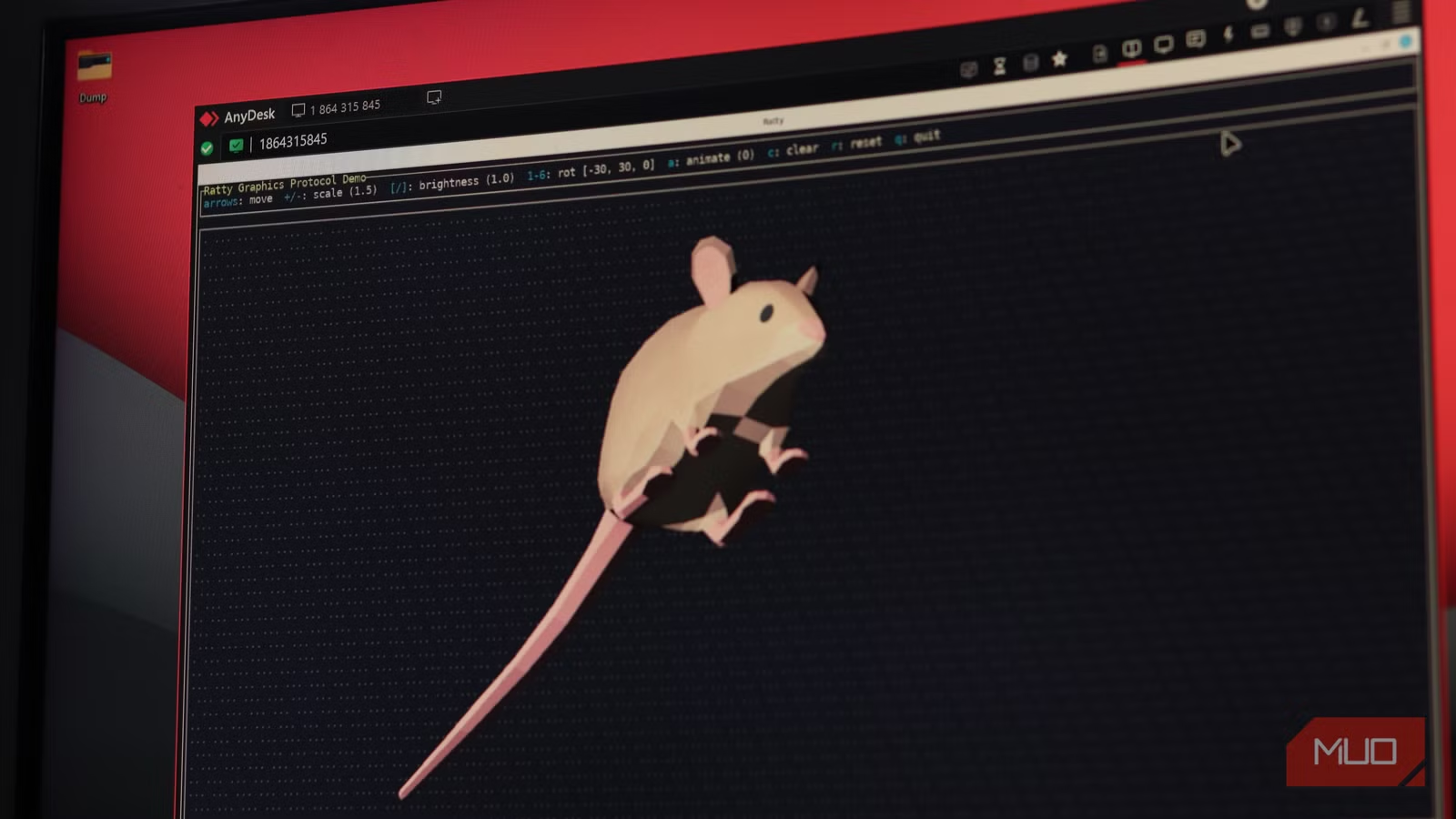

Most of us have seen the terminal as the most brutally efficient, no-nonsense tool. A blinking cursor and an active directory are all you see, and the output of your actions is all that’s given back. It doesn’t have a fancy interface, but it gets the job done, and often significantly faster than its graphical counterparts. But that’s no longer the case.
Ratty is here to change that. It’s a GPU-rendered terminal that can embed actual 3D models right next to your commands, all while giving you a spinning rat as your cursor. The concept might sound like an elaborate joke, but it’s one of those tools that can make you stop dreading the terminal.
Related
5 programs you need to know about as a Linux user
Linux is more than a backup OS, and these programs prove it.
The terminal was never supposed to do this
The idea that turned a text interface into a 3D renderer
The origin of Ratty traces back to TempleOS, Terry Davis’ eccentric operating system that supported sprites (graphical images) natively in a terminal. The command line was designed to handle sprites as first-class, insertable document entries rather than just text. This meant that you could drop 3D meshes and images directly onto your shell, your source files, and even your documentation—all in the same interface.
Orhun Parmaksızm, the Rust developer behind Ratty, Ratatui, git-cliff, and several other beloved open-source terminal tools, had the idea sitting at the back of his head for years. But the final motivation came from a rotating VT100 terminal animation built by a community member for his Terminal Tuesdays podcast, as explained in his blog. This was a live Ratatui terminal interface composited directly onto a 3D model’s screen texture and rendered in real time via Bevy.
OS
Windows, macOS, Linux
Developer
Orhun Parmaksız
Price model
Free, Open-source
Ratty is an experimental terminal emulator and graphics protocol that enables high-performance image and 3D rendering inside terminal emulators, bringing modern graphical capabilities to traditionally text-only interfaces.
Under the hood, it’s surprisingly clever
How the rendering pipeline pushes graphics through a terminal
Screenshot by Yadullah Abidi | No Attribution Required.
Ratty lives on a rather simple, three-layer architecture. The first layer is quite conventional: it uses portable-pty to handle pseudo-terminal operations and vt100 parses escape sequences, just like any other terminal emulator on the internet. Nothing fancy here.
The second layer is where it diverges. Ratatui takes the parsed terminal state and rebuilds it as a cell buffer before handing that off to Parley for font shaping and Vello for GPU-accelerated text rendering. The rendered output lands on a GPU texture.
From there, the game engine Bevy picks that texture up and composites it onto a full 3D scene alongside any registered 3D objects, lighting, and cameras. This separation is intentional: terminal emulation and presentation are completely decoupled, which is why you can warp, title, and twist the entire terminal surface without touching a single PTY byte.
Screenshot by Yadullah Abidi | No Attribution Required.
The spinning rat cursor is the most obvious example of this. On the terminal end, the cursor is just a blank cell. Bevy owns a completely separate 3D entity mapped to that cell’s coordinates in scene space, animating independently with bob, spin, and scale driven by elapsed time. It’s an architectural trick that makes the whole thing feel native rather than hacked together.
The Ratty graphics protocol
The protocol making terminal graphics practical at last
Embedding a game engine in the terminal is one thing, but Parmaksız went one step ahead and built a protocol that lets other applications use it. The Ratty Graphics Protocol (RGP) transmits commands over APC escape sequences—the same low-level mechanism used by protocols like Kitty’s image protocol—to register 3D assets, anchor them to specific terminal cell coordinates, and control animation, scale, depth, and color.
Ratty graphics protocol has limited support on Windows at the time of writing. For best results, use Linux.
All an application has to do is query whether the terminal supports RGP, register an .obj or .glb file by ID, then place it at the desired row and column anchor cell. When the anchor cell moves, the 3D object moves with it. RGP’s companion ratatui-ratty widget library wraps all of this into a clean Rust API, letting any existing ratatui terminal interface app embed 3D models with a dependency addition and a few lines of code.
It’s more useful than it sounds
Real applications beyond the initial novelty factor
Screenshot by Yadullah Abidi | No Attribution Required.
If you’re reading this and scratching your head as to why a terminal even needs to support 3D graphics, the answer is simple. The single most practical use case is browsing directories full of 3D model files.obj, .glb, .stl, .step, and previewing them in-line without opening Blender or a dedicated CAD viewer.
3D work from the command line is not very frequent, but for anyone doing it, this feature alone makes Ratty worth an install. I love the fact that I can download an STL file from anywhere and preview it over the terminal on my Linux server without having to install a slicer or 3D design software on multiple computers.
Beyond that, several example apps can show you what’s possible. Ratscad is a terminal-based CAD application. ComChan is a serial monitor that visualizes telemetry data as a live 3D object. There’s even a 3D drawing canvas, a TempleOS-inspired inline document editor, and an endless runner game, all running inside the terminal. 3D plotting is another obvious target, letting analysts and scientists render interactive plots inline during analysis scripts instead of having a dozen matploitlib windows open.
The limitations are obvious—but so is the potential
Why terminal graphics are worth paying attention to
Ratty is absolutely not a daily driver terminal emulator or a replacement for the likes of Alacritty or Kitty. The GPU dependency means it won’t function over SSH. Bevy also comes with a substantial dependency tree, which means a first compile will take ages and be taxing on your CPU. The current CPU-GPU memory round-trip in the rendering pipeline is also a gaping inefficiency.
Related
There’s a version of PowerShell that’s even more powerful — and it’s already on your Windows PC
I switched to WSL 2 and finally stopped feeling locked into Windows — here’s why that changes everything.
But none of that undermines what Ratty actually is: a working proof that the terminal is not a finished artifact. Weird and useful terminal commands are one thing, but when the terminal itself is this capable, you just use it more. Rust brought the performance and ecosystem to make it happen, without writing a graphics engine from scratch. The spinning rat cursor is the joke, but the architecture underneath it is the argument. Terminals have been text grids since 1978. Ratty is questioning whether they have to stay that way.
