

Lance Whitney/ZDNET
Follow ZDNET: Add us as a preferred source on Google.
ZDNET’s key takeaways
- Google’s AI Overviews will now link to advice from other people.
- The overviews will also lead you to your favorite news sources.
- Links to the sources will also appear next to the relevant text.
I often use Google’s AI Overviews to get a summary of the information I need when I run a search. But the overview itself rarely provides enough details to fully answer my question. That’s why I always consult the sources used to generate the summary. With that in mind, Google has enhanced its AI Overviews with five new features designed to better flesh out the subject of your search.
1. View advice from other people
Sometimes when I search for information on a particular topic, I’d like to hear from other people who have knowledge or experience in that area. For example, maybe I’m looking for help on what type of food to feed my cat, given that he has a sensitive stomach. And I’d like to hear from fellow cat owners with their take on this issue.
Now, AI Overviews will show you advice from other people. Appearing in a section called Expert Advice, these comments will appear as brief remarks from people via discussion forums, social media, and other online sources. Each comment will show you the name of the person or the forum and include a link that will take you to the full discussion. From there, you can read more comments about your topic and even join the discussion if you’d like.
Also: How to remove AI Overviews from Google Search: 4 easy ways
As one example given by Google, maybe you’re trying to find out how to take the best photos of the northern lights. When you run a Google search on this subject, you might see comments from an online photography forum with advice on exposure time and other elements, along with clickable links so you can head to the full conversation.
2. Access your news subscriptions
I rely on certain favorite news sources, such as ZDNET, that I’d like to consult in a Google search. But those sources aren’t always easily accessible from the AI Overview. To remedy that obstacle, Google will now highlight links to your news subscriptions directly in AI Mode and AI Overviews. You can then easily click the link to the news source to view the full story to better answer your question.
Also: Sick of AI in Search? These 7 Google alternatives still put links first
Running early tests on this feature, Google said that people were significantly more likely to click links that were labeled as their subscriptions. Publishers who want to help their subscribers access their stories in a Google AI search can head to the Subscription Linking page to set this up.
3. See links to the sources in the summary
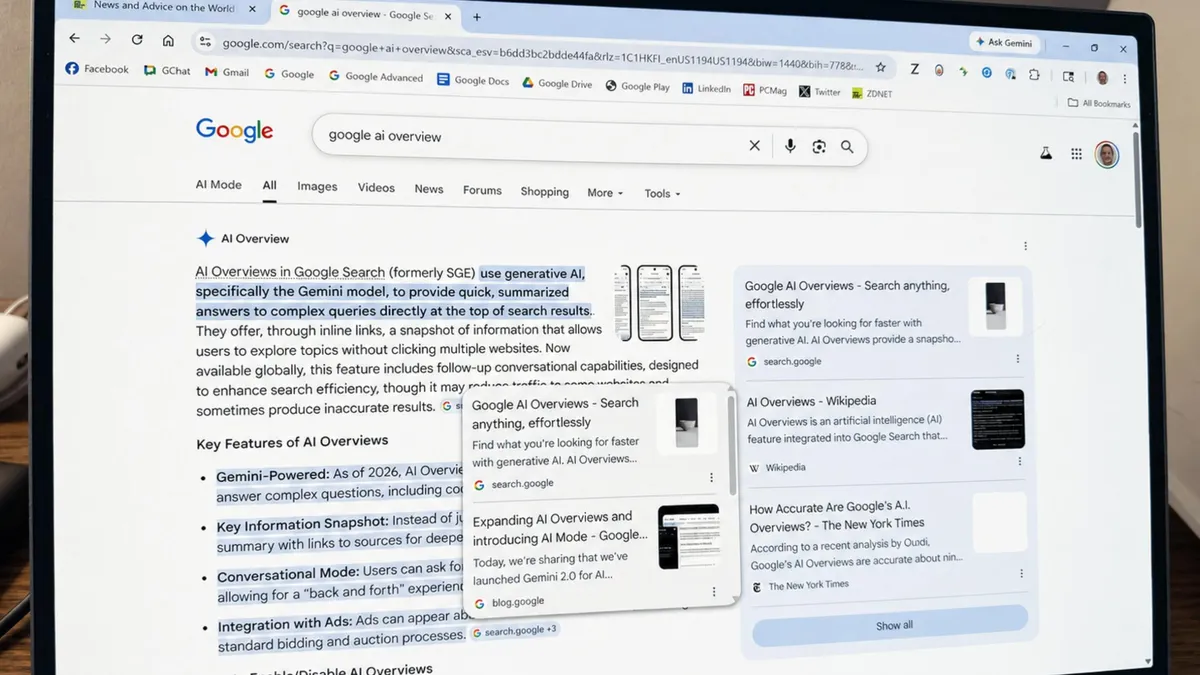
AI can make mistakes. That’s another reason I always consult the original sources used in a Google AI Overview. But those sources aren’t always easy to see or access. To help you view the right sources, Google will now include links to them directly next to the relevant text in the AI summary.
Also: Use Google AI Overview for health advice? It’s ‘really dangerous,’ investigation finds
As one example from Google, maybe you’re searching for information about going on a bike-riding trip through California. In response, the AI Overview displays a series of bullet points with details about such a trip. With the latest update, the summary might now add a link to a Pacific Coast bike touring guide next to the bullet point about terrain or a link to a blog post about bike ride training next to the bullet point about daily mileage.
4. Explore additional sources
Beyond viewing the original sources used to generate the AI Overview, I sometimes would like to access even more original sources on the subject. Toward that end, Google is adding a new section with suggestions on other sites to consult. Appearing below the AI summary, this section will contain links to articles or analyses on different aspects of the same topic.
Also: You can turn off Gemini in Gmail, Photos, Chrome, and more – here’s how
For example, maybe you’re investigating how cities are adding more green spaces to their environments. Below the AI summary might be a case study on how Seoul is successfully restoring its streams or a report on how architects designed New York City’s High Line park.
5. Preview linked websites in the summary
Google’s AI Overviews typically include links to relevant websites. But you have to click the actual link to find out what the site offers. Now, Google will display a quick preview of a website when you hover over its link. The preview will show you the name or title of the site so that you can better judge whether it’s worth visiting.
I know that I’m sometimes hesitant about clicking a link to a site without knowing where it will take me. The preview is designed to help people feel more comfortable about visiting sites linked in the AI Overview.
Also: I tested ChatGPT Plus vs. Gemini Pro to see which is better – and if it’s worth switching
“We’re continuing to enhance how we show and rank links in our generative AI Search experiences and using techniques like query fan-out, which helps us dive deeper into the web to find the most relevant sites for your search,” Google said in its blog post about the latest enhancements. “By improving the visibility and helpfulness of links and showcasing original voices, we’re building AI in Search to help you discover the richness of the web, connecting you directly with the sources and creators you’re looking for.”
