

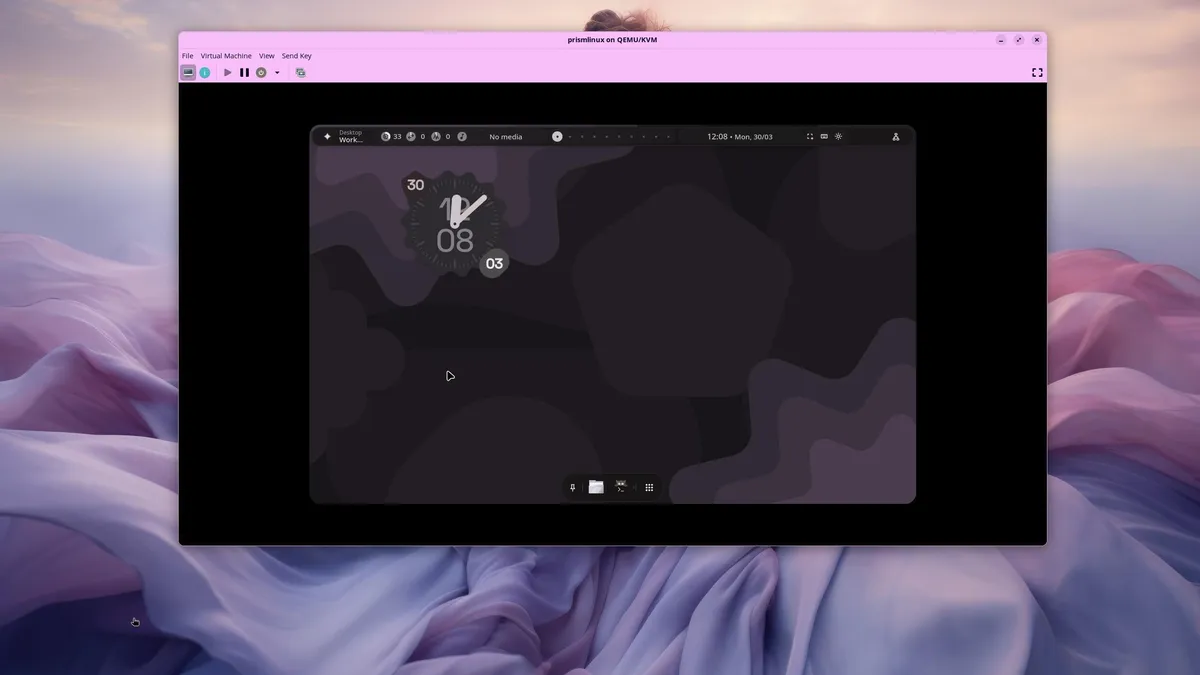
Screenshot by JackWallen/ZDNET
Follow ZDNET: Add us as a preferred source on Google.
ZDNET’s key takeaways
- Prism Linux is an Arch-based distribution with plenty to offer.
- You can choose between different desktop environments/window managers.
- The Prism Linux installer is one of the best I’ve ever used.
If you’ve followed me long enough, you’ll know that I’ve tried several Arch-based Linux distributions to find the holy grail of installers.
I believe I’ve found it in Prism Linux.
Also: How to install Arch Linux without losing your mind
This Arch-based Linux distribution claims to be the “a high-performance system built for stability.” What the developers should be calling it is “The Arch-based distribution with a killer installer and everything you need in a desktop OS.”
You think I’m kidding? Try the Prism installer and see what you think. As soon as the installer began, I knew something special was on its way.
Arch-based distro made easy
The Prism Linux installer makes installing this Arch-based distribution so easy that anyone, regardless of experience, can install Linux. During installation, you can choose which desktop environment you want. (I opted for Hyprland.) You also get to choose the applications you want installed — including web browsers, desktop tools, system tools, utilities, office and productivity, multimedia creation, audio editing, communication, code editors and IDEs, development tools, gaming, security and privacy, and virtualization. Essentially, you get to create exactly operating system you need… all during the installation.
Also: How this strange little distro can boost your Linux skills
You also get to choose the kernel you want, decide whether to include Flatpak, enable ZRAM, and set the hostname. Once you’ve done that, create your user, review the installation, and you’re off and running. My chosen Prism Linux installation took less than 5 minutes to complete. (I added a lot of extra packages.)
But don’t be fooled, the awesomeness that is Prism doesn’t stop at the installer. Since I installed the Hyprland window manager, I was excited to give it a go. When I logged in, I found the desktop to be quite beautiful.
If you’re not accustomed to a tiling window manager, I highly recommend you choose one of the other options (such as KDE Plasma or GNOME). However, if you’re adventurous, Hyprland is pretty nifty.
Built-in AI tool included
One of the biggest surprises was that the desktop includes a built-in AI tool. Click the top left icon, and the tool appears, ready for your first query. You first have to select a model by typing /model, then selecting the one you want. You are limited to only three models:
- gemini-2.5-flash
- gemini-3-flash
- mistral-medium-3
Each of the above requires an API key, and the app will direct you to the appropriate location to find it.
This is a really handy addition for those who depend on AI.
Jack Wallen/ZDNET
One of the first things I realized is that this instance of Hyprland doesn’t include an app launcher, so I had to install rofi, which is not the easiest app launcher I’ve ever used. On top of that, the keyboard shortcut for that launcher wasn’t functioning as expected.
Also: How much RAM does your Linux PC actually need in 2026? An expert’s sweet spot
And then I hit paydirt. After all my attempts to install a different app launcher, I discovered the built-in option, which was quite good. I didn’t notice this at first because the launcher was associated with the virtual desktop switcher. Click the far right icon on the dock (the square of dots). When I first launched this, I couldn’t get beyond the fact that Prism had 10 virtual desktops created by default.
Don’t be silly like me and miss out on the built-in launcher.
Jack Wallen/ZDNET
Above the virtual desktop switcher was the launcher I was looking for. Type the app you want to launch, and you’re good to go. On top of that, you could use that tool as a desktop search tool and even as a calculator.
All was well with Hyprland on Prism.
Here’s the thing, though: If you’re new to Linux, do not install Prism with Hyprland or Sway. Instead, go with one of the mainstream desktops (such as KDE Plasma or GNOME); otherwise, you’ll find yourself more frustrated than not (unless you’re willing to spend a good amount of time acclimating to a tiling window manager). Don’t get me wrong, Hyprland is awesome — it’s just not the best choice for newbies.
Also: Goodbye, VirtualBox – I found a better, more reliable VM manager for Linux
Since I’ve used Hyrpland before, I found Prism’s take on the tiling window manager quite nice. There are just enough extra goodies to make it stand out from some of the other distributions that ship with Hyrpland.
If, on the other hand, you want to take a walk on the wild side, do give Hyprland on Prism a try. I found it to be a lot of fun and really cool looking.
Out of the box goodness
What I really appreciate about Prism is that, thanks to the installer, it includes everything I needed out of the box. There was nothing I needed to install to hit the ground running with this Linux distribution.
There are so many apps you can choose from during the installation.
Jack Wallen/ZDNET
Because I was able to curate only the software I wanted, I felt as if Prism was one of the more complete out-of-the-box experiences that I’d had in quite some time.
Yes, it’s based on Arch Linux, but thanks to Octopi (the GUI app store) and the joy of using Hyprland, it didn’t feel like Arch.
Also: This glorious-looking Linux distro is unlike anything I’ve ever seen in my decades of use
Curious? You should really check out Prism Linux. This distro is fun and includes everything you need, without the challenges of the distribution it’s based on. Just make sure your first time with Prism is with either KDE Plasma or GNOME. Then, when you’re feeling adventurous, give Hyrland or Sway a try. Grab an ISO of Prism Linux from the official download page.
